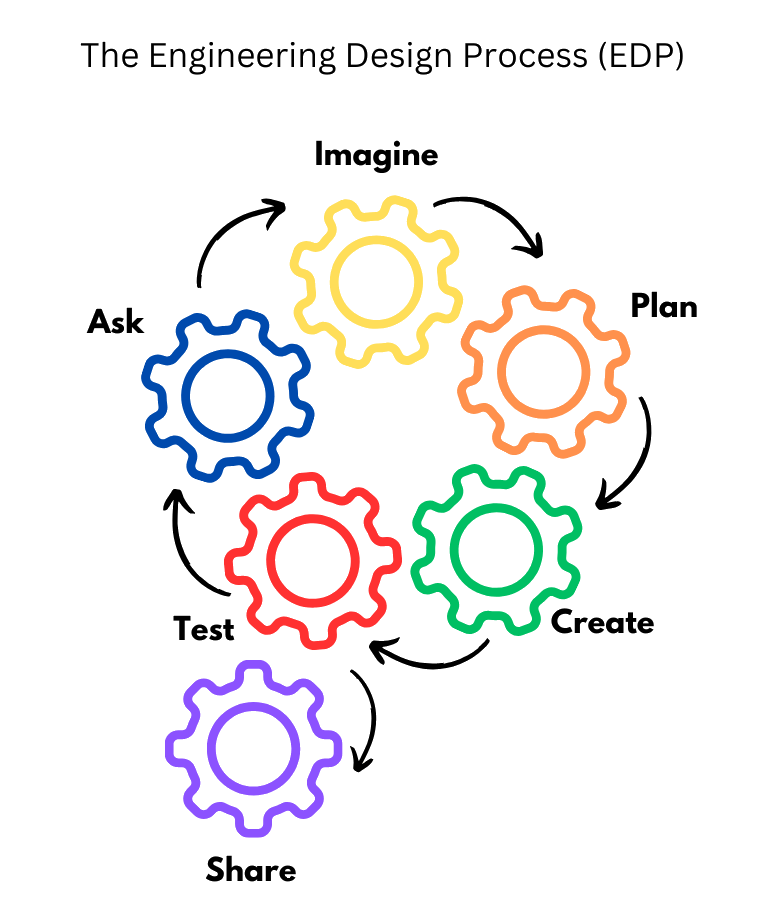
One of my favorite parts of my role as a Helpdesk Supervisor in a university IT Department is finding creative ways to train our Student IT Support Technicians. This quarter, I took on a project that let me combine my passion for education and instructional design with a real-world challenge: designing a blended learning experience to build decision-making skills.
Goal: Help technicians confidently handle tricky support scenarios, make smart decisions, and communicate clearly, while keeping exceptional customer service front and center.
The project required creativity because I had to navigate limitations—time, available resources, and the need for a training model that’s scalable and reusable for future supervisors. Since our university runs on a Microsoft-based environment, I focused on tools that were effective, accessible, and free within our existing licenses. Balancing practicality and engagement made the project even more rewarding.
Why Decision-Making
Some of the toughest moments for student technicians aren’t about the technology—they’re about the situations they face. Should they try one more troubleshooting step, or escalate? Does the customer know what’s happening?
Decision points impact outcomes:
Right choices: Faster ticket resolution, higher user satisfaction, confident technicians
This training addresses those challenges through realistic, interactive scenarios while being mindful of our team’s time supporting users. From day one, technicians practice decision-making in scenarios mirroring real work, building confidence and competence.
Blended Learning in Action
To make training both flexible and effective, I designed two complementary formats:
Asynchronous Module (Canvas)
Self-paced module, included as Module 3 in the onboarding course
Other modules were adjusted to scaffold learners toward the decision-making module (Module 3)
Ideal for both preparation and reinforcement
Synchronous Workshop (Weekly Tech Meeting)
45-minute interactive session
Group discussions, live polls, scenario-based exercises
Lets students practice decisions in real time
This blended approach ensures both self-directed and collaborative learning, maximizing engagement while respecting time constraints.
Working Within the Microsoft Ecosystem
Since the university runs almost entirely on Microsoft tools, I prioritized sustainability, accessibility, and cost-efficiency. I built the decision-making simulation in Microsoft Forms:
Used branching logic to create “choose your own path” scenarios
Seamless on mobile and desktop
Accessible to anyone with an SPU account
Public duplicate created for sharing
Tools Used:
Tool
Purpose
Microsoft Forms
Branching scenario simulation, polls, word clouds
Canvas LMS
Hosting asynchronous module
PowerPoint + Gamma AI
Synchronous workshop slides with interactive elements
ChatGPT
Refining scenario text and discussion prompts
Descript
Editing video walkthroughs
LOVO
AI-generated voiceover
Powtoon
Creating animated avatars for the decision-making scenario
Clipchamp
Additional video editing for module walkthroughs
If I had more time and resources, I’d add some gamification with scoring and AI-powered feedback that could adapt in real time to each technician’s decisions. Even without those extras, this setup still offers a strong interactive experience that works well for both synchronous and asynchronous learning.
Active and Engaged Learning Through Collaboration
Scenario-Based Learning Technicians navigate realistic scenarios, make decisions, see outcomes, and receive feedback, building problem-solving confidence.
Peer Collaboration
Asynchronous: Discussion boards let new hires reflect individually, then respond to prior participants’ posts. I add my own responses so technicians can compare their thinking with a supervisor’s perspective.
Synchronous: Tech meetings are discussion-focused with polls, word clouds, and breakout groups tied to simulations. Teams discuss, defend reasoning, and reflect collectively.
This approach blends independent learning with team-based collaboration, ensuring technicians strengthen both decision-making and communication skills.
Learning Outcomes
By completing this training, technicians can:
Analyze and respond to common IT support scenarios
Communicate decisions effectively with users and teammates
Collaborate to solve complex problems
The Artifacts
To make this project portfolio-ready, I documented everything for reuse and demonstration:
Canvas Module Sample – Self-paced training with scenario activities and video walkthroughs
Design blended learning experiences in real-world workplace constraints
Select accessible tools within an existing technology ecosystem
Apply AI-assisted content creation for improved engagement
Foster scenario-based, collaborative learning
Next steps include exploring gamification and adaptive AI feedback to make asynchronous learning more personalized and dynamic, supporting continuous development of decision-making skills for student technicians.
Drawing on my experience supporting faculty as a Digital Learning Teacher and now in higher education, I’ve continually sought ways to help educators adopt meaningful technology in their practice. This course deepened that motivation by encouraging me to design a professional learning program that centers on AI tools in education, with the goal of growing into the role of an Instructional Technologist.
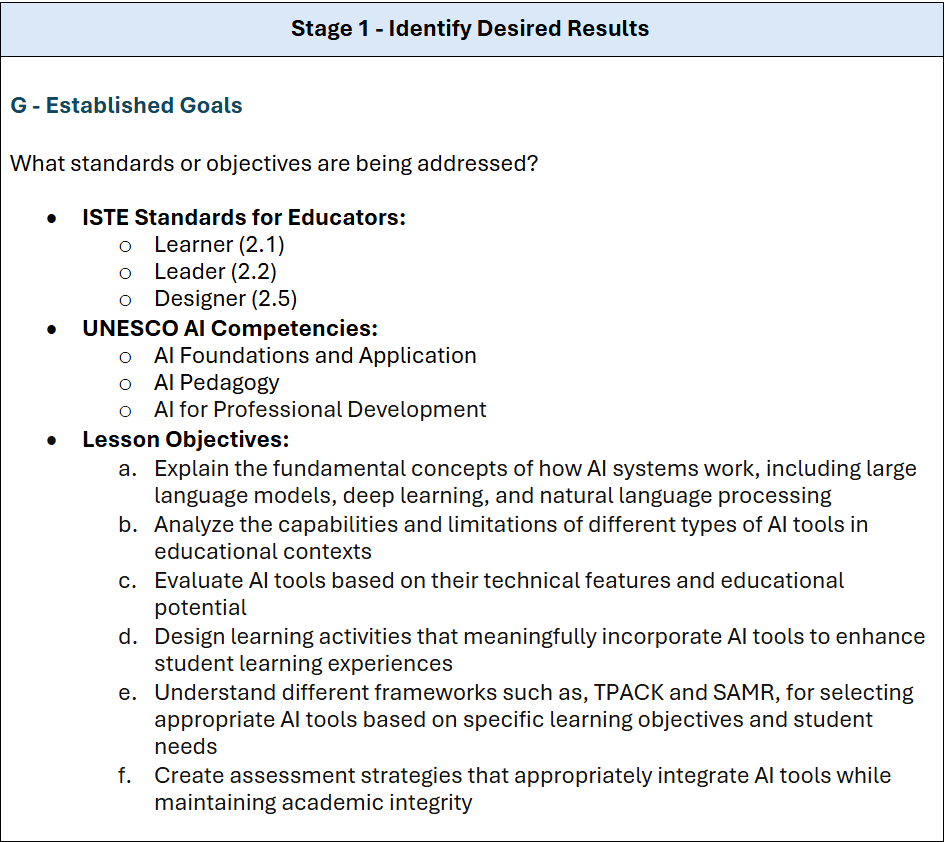
For this project, I collaborated with Colleague AI to design a professional learning lesson plan focused on AI and course integration. I used the Backward Design framework (UbD) to guide the process, starting with the learning outcomes I wanted educators to walk away with.
The goal was to help educators better understand how to thoughtfully and ethically integrate AI tools into their teaching. I aligned the lesson with the ISTE Standards for Educators and UNESCO’s AI in Education framework, making sure the focus remained on both strong pedagogy and a human-centered approach to technology use.
Topic & Standards
My design was grounded in the ISTE Standards for Educators—particularly:
2.1 Learner: Actively learning to improve practice and explore innovative applications of technology.
2.2 Leader: Advocating for equitable access and modeling lifelong learning.
2.5 Designer: Designing authentic, learner-driven experiences supported by technology.
I also integrated guidance from UNESCO’s AI in Education framework, particularly the domains of AI Foundations and Application, AI Pedagogy, and AI for Professional Development. These standards emphasized a human-centered, pedagogically grounded approach to integrating AI into learning environments.
Desired Results & Assessment
By the end of the program, educators should be able to:
Understand the foundations of AI, including how AI and large language models (LLMs) work.
Apply AI integration principles within lesson planning.
Evaluate AI tools for pedagogical alignment using TPACK and SAMR frameworks.
Maintain a human-centered approach that balances innovation with ethical responsibility.
To assess their learning, participants will:
Build a professional portfolio with annotated lesson plans that demonstrate purposeful tool selection.
Provide rationales for tool use that reflect pedagogy, content, and context.
Submit documentation of tool use, including classroom impact, student engagement, and changes to instructional practice.
Reflect weekly through journals and create a growth plan outlining future learning goals.
Present their learning in Professional Learning Community (PLC) sessions to extend knowledge sharing.
Learning Plan & Tech Integration
The program spans 6 weeks, meeting three times per week, with each week scaffolding knowledge and hands-on experience:
Week 1: Introduces AI literacy and integration frameworks like TPACK and SAMR.
Week 2: Focuses on ChatGPT and LLMs, emphasizing prompt design and ethical classroom uses.
Week 3: Guides lesson planning using Khanmigo, Gamma AI, and Colleague AI to explore AI-assisted content generation.
Week 4–5: Participants choose an AI tool and implement it through both TPACK and SAMR lenses, receiving feedback along the way.
Week 6: Final portfolios are submitted, and educators present key learnings through PLC presentations to model knowledge sharing.
Throughout, digital tools are not just explored—they are integrated into teaching design and evaluated based on their impact, relevance, and ethical use.
Reflection
This design process really made me appreciate how important it is to be intentional and structured when designing learning experiences, especially when working with evolving tools like AI. Using Colleague AI gave me a lot of creative possibilities, but at times I felt overwhelmed by the amount of choices. Next time, I would come in with more clarity, some specific goals or constraints, to help guide the brainstorming and keep things focused.
One thing that worked really well was the way the lesson built from foundational concepts into practical application. It helped me think more about how to scaffold learning in a way that is both meaningful and flexible. I also saw just how valuable it is to include reflection and peer sharing in professional learning, as it is what helps ideas stick and gives educators space to grow together.
Overall, this project made me feel more prepared and confident as I move toward a future in instructional technology. It took more planning than some of the work I have done before, but it also confirmed that this is the kind of work I want to keep doing—supporting educators in using technology thoughtfully, ethically, and with real impact. It reminded me that digital leadership is not just about the tools. It is about helping others design lasting, transformative learning experiences.
With the rapid advancement of digital tools and AI technologies, educators and instructional designers now have more powerful resources than ever to collect, analyze, and act on learning data with precision and speed.
For instructional designers, this opens up new possibilities for understanding how learners engage with content and how courses can be improved. In a previous article, I explored MOOCs and online learning, highlighting how instructional design might help address low completion rates. But as Loizzo (2015) notes, completion rates alone may not offer the clearest picture of learner success, especially when students have varying motivations and goals. So if completion rates aren’t the most useful metric on their own, what data points should instructional designers be paying attention to? And how can AI support instruction designers in identifying and applying that data meaningfully?
AI tools are reshaping instructional design by streamlining data analysis and enabling more personalized, scalable, and informed course development. When applied thoughtfully, AI can uncover patterns that might otherwise go unnoticed, support data-driven decision-making, and enhance learning outcomes. At the same time, these opportunities come with important challenges, including concerns around ethics, bias, and ensuring that implementation remains grounded in human-centered and intentional design.
The Intersection of AI, Data, and Instructional Design
Educational Data Mining and Learning Analytics
Educational data mining (EDM) and learning analytics (LA) give instructional designers deeper insight into student engagement and success. Completion rates alone don’t reflect the full picture. By examining factors like course activity, demographic trends, feedback, and content usage, Designers can better understand learner behavior and identify which students are at-risk and where support is most needed (West et al., 2018).
For more evidence of valuable data points, institutions like the University of Phoenix collect and combine a wide range of information, including grades, discussion posts, tech support tickets, and application records (West et al., 2018). Integrating these data sources enables the creation of predictive models that support student persistence and guide course improvements.
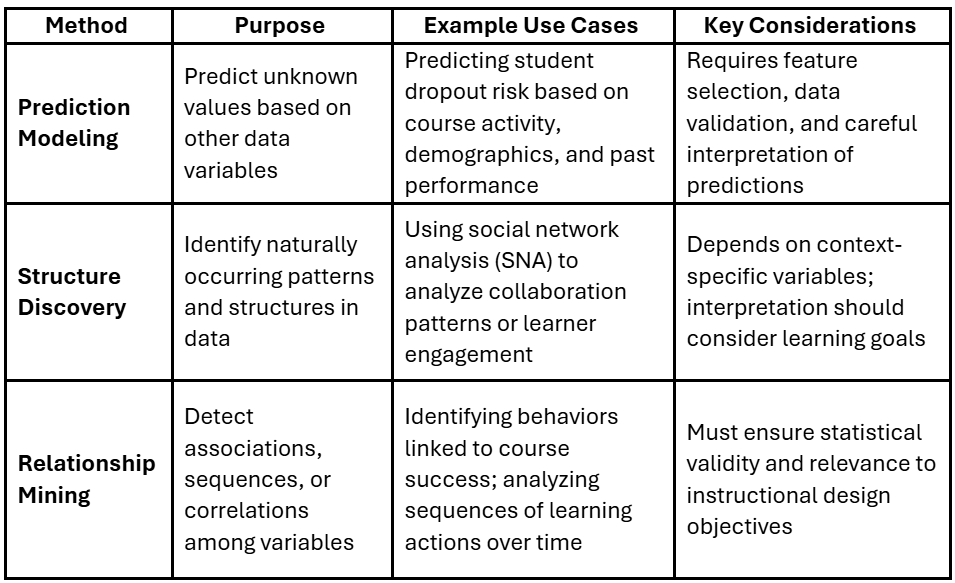
To manage this scale of data, distillation processes are used to reduce larger datasets into more manageable forms, while maintaining key patterns (Kang et al., 2024). Once data has been distilled, various analytical techniques in EDM/LA can be applied. These techniques are typically categorized into three core methods. Table 1 summarizes these methods as outlined by West et al. (2018).
Table 1: Overview of Educational Data Mining & Learning Analytics Methods (West et al., 2018)
These methods help instructional designers move beyond surface-level metrics and toward deeper insights that directly inform course development and student support strategies. However, they can be time-consuming and costly to implement—creating opportunities for AI to enhance and streamline the process.
How AI Enables Data-Informed Decision Making (DIDM)
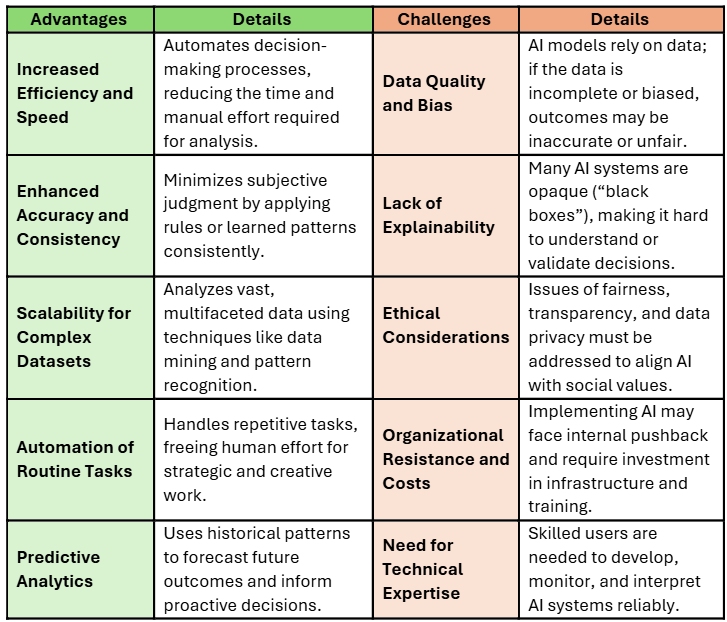
AI plays an increasingly central role in data-informed decision making (DIDM) by enabling faster, more accurate, and scalable analysis of large datasets. These technologies can streamline workflows, improve predictions, and uncover patterns that might otherwise go unnoticed. However, they also introduce new challenges related to bias, explainability, and implementation barriers. As instructional designers adopt AI, it’s essential to weigh both the benefits and limitations to ensure responsible and ethical use. Table 2 highlights these advantages and challenges, based on Balbaa and Abdurashidova’s (2024) research.
Table 2: Advantages and Challenges of AI in Decision Making (Balbaa & Abdurashidova, 2024)
AI’s Impact on Instructional Design Roles and Practices
Ethical Use of AI in Instructional Design
As AI tools become more embedded in instructional design practices, it’s critical to consider their ethical use. UNESCO emphasizes a handful of guiding principles that should shape how designers adopt AI. These include transparency, equity, respect for human autonomy, prevention of harm, responsibility, and strong data governance (Miao & Cukurova, 2024). These values are particularly important when dealing with sensitive student data and designing learning environments that aim to support all learners.
One major concern is algorithmic bias, which happens when the data used to train AI systems contains historical or societal biases (Balbaa & Abdurashidova, 2024). This can lead to unfair or inaccurate outcomes, particularly for marginalized groups. For example, if training data focuses too heavily toward one demographic, AI-generated recommendations or decisions may unintentionally exclude others.
Privacy is another key issue. While longitudinal data can offer powerful insights into learning patterns and outcomes over time, gathering that much personal information also raises important ethical and legal concerns. Instructional designers must balance the benefits of data-driven insight with the need to follow data protection laws and respect learners’ digital rights (West et al., 2018).
Finally, many AI models operate like “black boxes,” meaning it’s not always clear how they’re making decisions (Balbaa & Abdurashidova, 2024). This lack of transparency can make it tough to build trust in the tools we’re using—and even harder to explain or defend their outcomes.
Human-AI Collaboration in Design Work
Another key principle in UNESCO’s AI compliance guidelines is the importance of taking a human-centered approach when integrating AI (Miao & Cukurova, 2024). In instructional design, this perspective helps ensure that AI tools support ethical responsibility and meaningful learning outcomes. While AI can analyze large datasets and surface patterns rapidly, it lacks the contextual awareness, empathy, and critical thinking that human designers provide. Keeping humans in the loop leads to learning experiences that are not only efficient, but also inclusive, pedagogically sound, and aligned with learner needs.
With human oversight in mind, a structured review process helps uphold both quality and ethical standards. For example, when designing AI-assisted simulations for a health sciences course, a designer might:
Review for factual accuracy and relevance
Review for alignment with pedagogical goals and cognitive load
Review for inclusive language, tone, and accessibility
This iterative process reflects UNESCO’s emphasis on human-centered AI—where technology supports and enhances human decision-making, promoting efficiency, quality, and accuracy.
For more on this collaborative framework, see my article on the HAIH model (Human-AI-Human), which outlines practical strategies for integrating AI thoughtfully throughout any design process such as goal setting.
AI in Automating Routine Tasks
AI’s most immediate impact on instructional design is in automating repetitive or time-intensive tasks, giving designers more space for creative and strategic thinking (Ch’ng, 2023). Tasks like aligning learning objectives, organizing course content, or drafting initial assessment items can now be accelerated with AI tools.
When applied to the ADDIE model, AI plays a role across each phase:
Analysis
Traditionally, the analysis phase required significant time and effort, involving manual data collection through interviews, surveys, and reviewing historical learner data to develop accurate learner profiles (Ch’ng, 2023). AI changes this by streamlining data collection and interpretation. It can analyze complex datasets like LMS logs, survey responses, and performance trends much faster than a human could. This results in more accurate insights and reduces the burden on instructional designers.
Design & Development
AI tools enable designers to create text, images, audio, and video content quickly, even without deep technical skills. Voiceovers and auto-captioning make audio production more accessible, while visual and textual content can be generated on demand. The result is richer, more inclusive multimedia content created with less time and effort.
Implementation
AI-powered chatbots and asynchronous tools are becoming increasingly common in today’s courses. They provide learners with real-time feedback and support, which is especially valuable in online self-paced environments. Intelligent Tutoring Systems (ITS) take this further by personalizing instruction, helping learners navigate challenging concepts at their own pace and offering tailored guidance (Gibson, 2023).
Evaluation
AI supports both formative and summative assessment by offering features like automated grading, real-time feedback, and predictive modeling to identify at-risk students (Gibson, 2023). This enables instructors to intervene earlier and make adjustments as needed. Additionally, AI helps reveal patterns in learner behavior that can guide improvements in future course design
Reframing Instructional Design Work
As AI reduces the manual workload in areas like analysis and development, instructional designers have more space to focus on what really matters like improving the learner’s experience, advancing inclusive design, and thinking strategically. But to make the most of these tools, designers need access to professional learning environments that encourage exploration and build confidence. Without that support, it’s easy to miss out on the full potential of AI, and designers may hesitate to experiment or integrate it meaningfully into their practice.
Effective AI Tools and Strategies for Course Development
Overview of Instructional Design AI Tools
As AI becomes more integrated into educational technology, instructional designers have access to a growing suite of tools to support their work. Popular platforms like ChatGPT, Gemini, Claude, and Copilot are widely used because they’re easy to access, intuitive, and generally reliable for tasks like brainstorming, summarizing content, or drafting outlines. However, because these models are trained on broad and diverse datasets, they can sometimes generate “hallucinated” or inaccurate information that lacks context for instructional design.
For more targeted support, specialized AI tools designed for specific subjects, like education, offer greater value. These tools are often trained on instructional design principles and pedagogical frameworks, giving them a deeper understanding of concepts like learning progressions, cognitive load theory, instructional alignment, and scaffolding (Hardman, 2025). When integrated thoughtfully, they can help create more pedagogically sound learning experiences that are better aligned with course objectives and learner needs.
Supporting the Analyze Phase
AI can enhance traditional methods like surveys and interviews by streamlining and improving how data is gathered and interpreted:
SurveyMonkey – Helps instructors quickly create, distribute, and analyze surveys, gathering insights on learner needs and institutional goals (Hardman, 2024).
Descript or Fathom – Automatically transcribe and analyze recorded interviews or stakeholder meetings, making it easier to extract meaningful trends (Hardman, 2024).
Notebook LM – Allows users to upload documents and generate summaries or insights based strictly on their own data, providing a secure and focused environment for needs assessments.
Note on Privacy: As outlined in the UNESCO Guidelines for AI Competency, it’s important to protect student and institutional data. Designers should avoid inputting confidential student or institutional information into public models.
Tools like Microsoft Copilot with Enterprise Data Protection (EDP) offer added safeguards, ensuring that prompts and responses aren’t stored or used to train models (DHB-MSFT, 2025).
Supporting Other ADDIE Phases
AI can also be used across other stages of the ADDIE model, such as the design and development stages. For example:
Gamma AI and Canva – Create visually engaging course content, presentations, or learning modules.
Jasper – Assists with writing content that matches tone, clarity, and learning outcomes.
Khanmigo and Colleague AI– Offers AI-powered tutoring, lesson planning, and scaffolding specifically designed for educational settings.
The infographic below, curated by Dr. Philippa Hardman, outlines additional tools and shows how they align with each stage of the ADDIE model—offering a strategic and responsible approach to integrating AI into course development.
Popular AI tools used within the ADDIE model (Hardman, 2024)
Best Practices and Practical Applications
As with any instructional design tool, using AI effectively requires intentionality and thoughtful application. Simply inputting a question or request will not always result in high-quality or relevant output. To get the most from generative AI, it’s important to understand how to craft prompts and how to refine the content AI produces.
AI Prompting
Well-structured prompts lead to better, more focused results. When writing prompts for AI, instructional designers should aim to include specific information such as the task’s purpose, intended audience, content type, format, and tone (NC State University, 2025). This helps the AI generate responses that are more aligned with the instructional goals. For instance, prompting AI to “generate a quiz for adult learners on Bloom’s Taxonomy” will yield more useful results than simply asking it to “make a quiz.”
Use the prompt design table below, created by North Carolina State University, as a guide for crafting clear and detailed prompts that help AI generate accurate, well-structured, and relevant responses.
Prompt Design Table (NC State University, 2025)
Refining Generated Content
Whether using general tools like ChatGPT or specialized platforms like Khanmigo, it’s important to remember to approach AI as a support tool and not the final authority.
Instructional designers should always refine AI-generated content to:
Align with learning objectives
Simplify language for clarity and accessibility
Verify facts and correct errors
Match the tone and format to the course context
AI should enhance, not replace, human judgment. Thoughtful review ensures content remains accurate, pedagogically sound, and centered on the learner.
Conclusion
AI holds tremendous promise for transforming instructional design by enhancing data analysis, enabling personalized learning, and automating routine tasks. When paired with ethical practices and strong human oversight, AI can help educators meet the demands of personalized learning and improve data-driven decision-making. The responsible integration of AI requires ongoing attention to transparency, equity, and privacy to ensure its benefits are accessible to all learners without unintended harm.
Moving forward, the challenge is not whether to adopt AI, but how to adopt it wisely and equitably to ensure meaningful learning for all students. By embracing a human-centered approach that leverages frameworks like ADDIE and tools like Khanmigo, instructional designers can harness AI’s potential to create more effective, inclusive, and impactful educational experiences. To achieve this, instructional designers should advocate for professional development programs, such as workshops on ethical AI use or certifications in learning analytics, to build their AI literacy and confidence. With the right tools and training, instructional designers can lead the charge in creating innovative, equitable learning environments that empower all students.
References
Balbaa, M., & Abdurashidova, M. (2024). The Impact of Artificial Intelligence in Decision Making: A Comprehensive Review. ResearchGate. https://doi.org/10.36713/epra15747
Ch’ng, L. K. (2023). How AI Makes its Mark on Instructional Design.
Kang, I., Ram, P., Zhou, Y., Samulowitz, H., & Seneviratne, O. (2024). Effective data distillation for tabular datasets (student abstract). Proceedings of the Thirty-Eighth AAAI Conference on Artificial Intelligence and Thirty-Sixth Conference on Innovative Applications of Artificial Intelligence and Fourteenth Symposium on Educational Advances in Artificial Intelligence, 38, 23533–23534. https://doi.org/10.1609/aaai.v38i21.30460
Loizzo, J. L. (2015). Adult learners’ perceptions of MOOC motivation, success, and completion: A virtual ethnographic study. Theses and Dissertations Available from ProQuest, 1–300.
Massive Open Online Courses (MOOCs) have opened the door to education for millions of learners around the world. Originally developed to provide free and flexible learning for those without access to traditional classrooms, MOOCs have become a widely used resource, offering courses on nearly any subject or certification. While the idea of making education more accessible is exciting, MOOCs still face real challenges. Completion rates are low, engagement is inconsistent, and learners often drop off before reaching their goals.
These challenges highlight the importance of instructional design in shaping more effective and supportive online learning environments. Looking at both the strengths of MOOCs and the difficulties learners encounter, points to clear opportunities for applying appropriate design strategies informed by motivation theory. When course structures are intentionally aligned with learners’ needs and goals, MOOCs can move beyond simple accessibility and serve as more reliable pathways to meaningful and lasting learning outcomes.
The Benefits of MOOCs
MOOCs provide flexible and affordable learning opportunities, opening doors to self-development and competency-building beyond formal educational settings (Müller et al., 2024). By removing barriers like cost, location, and entry requirements, they open valuable opportunities for a broader range of learners.
As mentioned, one of the primary advantages of MOOCs is their affordability. Most MOOCs are either free or available at a relatively low cost, allowing learners to engage with high-quality content without the financial strain of tuition-based programs. Many MOOC platforms are open-source and designed to scale, which means they can support thousands of learners at the same time without limiting who can participate (West et al., 2018).
MOOCs also provide a unique blend of flexibility and structure through synchronous and asynchronous learning formats (West et al., 2018). Asynchronous courses allow learners to engage with content on their own time, which makes it easier to fit learning around work, family, or other responsibilities. Synchronous courses, on the other hand, include live sessions that bring people together in real time and help build a sense of community. This combination supports a variety of learning styles and makes it easier to design experiences that meet learners where they are.
Another key benefit of MOOCs is their potential to cultivate a sense of belonging and connection within a digital learning community (West et al., 2018). While the large-scale nature of MOOCs might seem impersonal, a handful of platforms include forums, peer feedback, and group activities that encourage collaboration and social interaction.
Despite these advantages, MOOCs face a persistent challenge of having notoriously low completion rates. Research shows that fewer than 15% of enrolled learners typically finish their courses (Loizzo, 2015). This issue raises important questions about learner engagement and the overall effectiveness of MOOCs, setting the stage for exploring how instructional design can make a meaningful difference.
The Role of Instructional Design in Improving MOOCs
Low completion rates in MOOCs are often linked to factors like course length, learner motivation, and engagement strategies (Jordan, 2015). However, these numbers don’t tell the whole story. Many learners enroll with different goals in mind. Some join to refresh prior knowledge or explore new topics without aiming for a certificate, which can lead to less consistent participation or course completion (Zhu et al., 2022). Still, improving course design to better support diverse learners and sustain motivation is essential to helping more participants reach their goals. Thoughtful instructional design offers strategies that enhance engagement, build community, and ultimately support higher completion rates in MOOCs.
Motivation and The Self-Determination Theory
Understanding what motivates learners is a key part of designing effective MOOCs. While most learners enter a course with the intention of completing it, motivation can waver due to factors like loss of interest, lack of prior knowledge, or difficulty managing time and staying self-directed (Zhu et al., 2022).
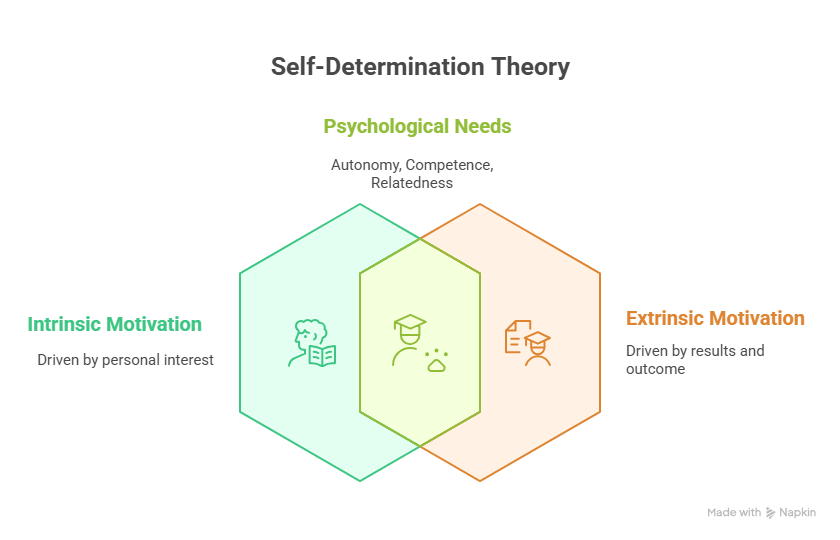
Motivation is often categorized as either intrinsic or extrinsic. Intrinsic motivation stems from personal interest or curiosity, learners who simply want to expand their knowledge or dive into a subject they enjoy (Zhu et al., 2022). Extrinsic motivation, on the other hand, is more outcome-driven and tied to goals like earning a credential, gaining a job skill, or fulfilling a professional requirement.
Both types of motivation tie into Self-Determination Theory (SDT), which emphasizes three basic psychological needs: autonomy, competence, and relatedness (Jain & Roy, 2024). When these needs are met, learners tend to feel more motivated and engaged performing tasks that they may not have a strong desire or interest in. However, the learner understands that the task may be necessary for more desirable outcomes.
To break SDT down a bit more, intrinsic motivation tends to grow when a course helps learners feel in control, capable, and connected—even in a virtual space (West et al., 2018). And while intrinsic motivation can be a strong driver, many MOOCs still rely on extrinsic motivators, especially when learners enroll with goals like career advancement or earning academic credit.
That said, not all extrinsic motivation is the same. Integrated regulation is a form of extrinsic motivation that has proven to be the most effective. Integrated regulation is where a learner understands the importance of a course and connects it to their identity or long-term goals (West et al., 2018). Therefore, even if the course itself isn’t particularly enjoyable and if the learner sees it as important for their future, the student is much more likely to follow through and complete it.
From a design perspective, supporting both intrinsic and extrinsic motivation is essential. This starts with clearly communicating course objectives and pacing at the very beginning. When learners know what to expect and how to plan their time, they’re more likely to stay committed. Research suggests that providing a roadmap, offering time-management tips, and helping learners anticipate the course pace can boost follow-through and reduce drop-off (Zhu et al., 2022).
For instance, organizing objectives into smaller, manageable chunks and incorporating regular check-ins or assessments can help build momentum (Rogers-Estable et al., 2015). These design choices support competence and provide a sense of progress, which can be motivating on its own.
Active Learning and Human Connection
While designing for motivation lays the foundation for learner engagement, maintaining that engagement throughout the course requires more than just clear goals and pacing. Learners also need to feel connected to the content and the learning community. This is where active learning strategies and human connection play a crucial role. By making the learning experience more interactive and socially supportive, MOOCs can not only reinforce motivation but also deepen understanding and increase retention.
Active learning emphasizes the importance of engaging with content in meaningful ways rather than passively consuming information. Research shows that simply watching videos or reading text rarely leads to deep learning or long-term skill development (Müller et al., 2024). Instead, retention improves when learners are asked to apply what they’re learning through activities such as problem-solving, discussions, and collaborative projects. These kinds of activities push students to reflect on the material and connect it to real-world situations, which helps build a deeper sense of competence. For more background on this topic, you can refer to my earlier article on active learning and learning theory.
Social interaction is another important aspect of active learning. Drawing on Vygotsky’s theory of the Zone of Proximal Development (ZPD), learners tend to make the most progress when supported by others—especially peers or instructors who can guide them just beyond their current level of understanding (West et al., 2018). Learning in a community allows learners to exchange ideas, receive feedback, and challenge their thinking, which can help deepen comprehension and improve motivation.
However, the asynchronous nature of many MOOCs can create a sense of isolation. Transactional Distance Theory explains that when learners feel psychologically distant from their instructor or peers, they may become disengaged or discouraged (West et al., 2018). To reduce this distance, course designers can implement strategies that promote regular communication and interaction. For example, scheduled live sessions, walkthrough videos, and personalized messages can simulate a more human presence in the course.
Discussion forums also serve as a valuable space for connection and reflection. When used intentionally, they can create accountability, spark thoughtful conversations, and cultivate a sense of community. Instructors or facilitators can encourage participation by posing open-ended questions, acknowledging responses, and sharing model answers after learners have submitted their own. Even automated instructor feedback on assessments can make a course feel more responsive and supportive for the learner.
Human connection can also be encouraged by offering networking opportunities, such as prompting learners to form Personal Learning Networks (PLNs) or encouraging them to connect on external platforms. When learners feel they’re part of a broader learning community—whether through peer support, instructor presence, or collaborative tasks—they’re more likely to stay engaged and persist through challenges, further supporting and encouraging their self-determination.
User Experience Design
Even with strong content and engaging activities, poor design can quickly derail a learner’s progress. When a course interface is confusing or unintuitive, learners must spend time figuring out how to navigate rather than focusing on the material. These friction points often stem from design flaws that create unnecessary barriers to learning (West et al., 2018).
Applying principles of User Experience (UX) andHuman-Computer Interaction (HCI)helps prevent these issues. A user-centered design (UCD) approach ensures that learners’ needs, behaviors, and expectations are prioritized throughout the design process (West et al., 2018). This can be implemented and considered when designing with an Instructional Design Model, which will be explored further in this article. Clean layouts, consistent navigation, and accessible features reduce cognitive load and help learners stay focused.
For example, consistent navigation menus, readable fonts, and clearly labeled buttons contribute to a smoother learning experience. Intuitive layouts and minimal distractions help learners stay on task. Even small decisions, such as how feedback is displayed, how long pages take to load, or whether course modules are visually grouped in logical sequences, can either enhance or interrupt the flow of learning.
Gamification and the Role of Play in Learning
As MOOCs continue to evolve, gamification seems like an effective strategy to keep learners motivated and engaged. Gamification is defined as the application of game design elements in non-game contexts (West et al., 2018). In educational settings, gamification has been shown to boost motivation, increase engagement, and support content retention (West et al., 2018).
Incorporating elements like digital badges, progress tracking, and certification milestones can help learners visualize their growth and celebrate achievements along the way. These reward systems tap into learners’ intrinsic and extrinsic motivations, encouraging them to persist through challenging material. For example, earning a badge for completing a module or receiving a certificate upon course completion can reinforce a sense of accomplishment and purpose.
Research also suggests that among game-based learning formats, games may offer greater learning gains compared to virtual worlds or simulations (West et al., 2018). However, the success of any delivery method ultimately depends on how well it aligns with the instructional goals and learner context (West et al., 2018). Effective instructional design ensures that game elements are not just decorative but serve a pedagogical purpose, guiding learners through meaningful challenges that reinforce learning objectives.
By thoughtfully integrating gamification into MOOCs, designers can enhance both the motivational and instructional quality of the course. When used strategically, these elements support learner autonomy, competence, and relatedness—all key factors in improving learner outcomes and course completion rates.
Instructional Design Models
With motivation, engagement, and user experience strategies in place, the next step is to consider how to structure the overall learning experience. Selecting an appropriate instructional design (ID) model is essential to align course objectives, delivery formats, and learner needs. The choice of model often depends on key factors such as whether the course will be synchronous, asynchronous, or a blend of both, as well as the specific context and goals of the MOOC (West et al., 2018).
Understanding the course context, such as the subject matter, the target audience and their background knowledge, and the types of materials that make the most sense, is essential for designing an effective learning experience. Frameworks like TPACK and the Backward Design process can help identify which resources and digital tools align best with the course objectives and delivery format. For more context, I explore the TPACK model in more detail in a previous article.
Guiding Principles
Establishing clear guiding principles upfront also further ensures the course design remains grounded in sound research and tailored to learners’ needs. For example, a MOOC focused on health behaviors might emphasize principles that support behavior change through interactive, learner-centered activities. These principles will be essential when developing MOOCs using any of the ID models discussed. The example below highlights guiding principles for this specific use case.
Guiding Principles for Health Behaviors (Müller et al., 2024)
The ADDIE Model
The ADDIE model offers a progressive, foundational framework for instructional design. It’s often seen as the overarching structure under which more specific models operate (West et al., 2018). What makes ADDIE particularly useful for MOOCs is its adaptability and its emphasis on thoughtful planning and evaluation at each phase of course development.
Analyze The first step is all about understanding the problem and identifying the performance gap (West et al., 2018). In the context of MOOCs, this means taking time to analyze the course topic, audience, and learning goals. A user-centered approach (UCD) can be especially helpful here by using tools like personas, user stories, and learner motivation mapping to clarify who your learners are and what they need (West et al., 2018). This is also where guiding principles can be defined, helping shape decisions around platform choice (e.g., Coursera, Udemy, or an institutional LMS) and ensuring the course meets learner expectations.
Design Once the course goals and audience are clear, the next step involves planning how learning will happen. During the design phase, prototyping tools and wireframing can support early ideation around content structure and user flow. Designers should verify learning outcomes, map them to assessments, and build a plan for content delivery that suits the learning format—whether it’s synchronous, asynchronous, or hybrid (West et al., 2018).
Develop This phase is where the course starts coming to life. Instructional materials, videos, assessments, and interactive elements are created and refined. Tools like Articulate 360, Adobe Captivate, and Elucidat can support the development of engaging, accessible content tailored to diverse learners.
Implement In the implementation phase, the course is launched and delivered to learners. This involves preparing the learning environment, onboarding students, and ensuring the platform is functioning as intended. Facilitators may also play a role in supporting learners during this phase, particularly in moderated or semi-synchronous MOOCs.
Evaluate Finally, while evaluation takes place throughout the design process, it becomes more formal in this final stage. This includes gathering formative feedback during development, analyzing collected data, and assessing the quality of instructional processes after the course launch (West et al., 2018). Importantly, this phase should consider learner feedback, platform analytics, and learner engagement data to measure what’s working and what isn’t.
Some researchers argue that because MOOCs are meant to attract a diverse and potentially unlimited number of learners, this challenges the ADDIE model’s emphasis on analyzing learners and their contexts at the start of the design process (Müller et al., 2024). For example, it may be unrealistic to expect that badges will engage all learners effectively, given that many MOOC participants focus only on select topics instead of the entire course. Based on this, some suggest that ADDIE may not be the ideal model for MOOC design and development.
While I understand the basis for this argument, I believe the analysis phase can still be highly effective when it includes a deep understanding of learner motivations and a clear definition of the target audience and their intentions for the course. Gathering this information and tailoring strategies to fit the MOOC context can significantly increase learner engagement and completion rates.
That’s why establishing clear guiding principles early in the design process is so important as it ensures the course remains focused and meaningful for the people it’s designed to serve.
The Successive Approximation Model (SAM)
SAM is a simplified, agile version of ADDIE with three iterative phases: Evaluate, Design, and Develop (Rogers-Estable et al., 2015). Its focus on real-time feedback allows for a more flexible and responsive course design process, which is especially helpful in dynamic environments like MOOCs.
The Successive Approximation Model (Rogers-Estable et al., 2015)
Evaluate
This phase centers on understanding the course context and learner needs. Key questions include:
Who is the target audience?
What are their goals and tech skills?
What learning format will be used?
Are prerequisites or tutorials needed?
How will learning be assessed?
Design
This phase involves planning course structure, storyboarding videos, outlining assessments, and organizing content. Like ADDIE, it ensures alignment with learning goals, but allows more flexibility for change as feedback comes in (Rogers-Estable et al., 2015).
Develop
Designs are built, tested, and refined. Because of its iterative nature, SAM supports continuous improvement as new learner feedback and needs emerge.
While SAM faces similar challenges as ADDIE when it comes to MOOCs, particularly the difficulty of precisely analyzing such a broad audience, it offers unique advantages. Its agile framework makes it more efficient to make adjustments as new learner needs emerge, which is especially valuable in open-enrollment environments.
Additionally, SAM is most effective when used alongside the backward design model (UbD) (Rogers-Estable et al., 2015). Like backward design, SAM is encouraged to start with clear, measurable course outcomes and designing everything else—activities, content, tools—to align with those end goals. This ensures that each element of the course serves a specific purpose and contributes to the intended learning experience.
By applying guiding principles, SAM begins by identifying the desired competencies and course outcomes, then works backward to ensure all content and assessments are aligned with those goals.
Conclusion
MOOCs have undeniably transformed access to education, providing unprecedented opportunities for learners worldwide. However, the persistent challenges of low completion rates and uneven engagement highlight that accessibility alone is not enough to ensure meaningful learning. As demonstrated, the key to unlocking the full potential of MOOCs lies in thoughtful instructional design—one that intentionally integrates motivation theory, active learning, human connection, user experience, and gamification.
By addressing learners’ psychological needs for autonomy, competence, and relatedness, and by creating interactive, community-oriented environments, MOOCs can provide deeper engagement and sustained motivation. Additionally, applying user-centered design (UCD) principles ensures that learners can focus on the content without unnecessary obstacles, while gamification adds an element of play and achievement that supports persistence.
Finally, adopting flexible, research-based instructional design models like ADDIE offers a structured framework for developing MOOCs that align with diverse learner goals and contexts. However, given the dynamic nature of MOOCs and their potentially unlimited enrollment, it’s essential to establish guiding principles before analyzing and gathering context within any design model. When these elements come together, MOOCs can transform from simple open-access platforms into dynamic, supportive, and effective learning experiences—expanding educational reach while helping learners achieve their personal and professional goals.
Jordan, K. (2015). Massive open online course completion rates revisited: Assessment, length and attrition. The International Review of Research in Open and Distributed Learning, 16(3). https://doi.org/10.19173/irrodl.v16i3.2112
Loizzo, J. L. (2015). Adult learners’ perceptions of MOOC motivation, success, and completion: A virtual ethnographic study. Theses and Dissertations Available from ProQuest, 1–300.
Müller, A. M., Tan, C., Goh, C., & Lim, R. B. T. (2024). The Design of a MOOC on Health Behaviors: A Practical Blueprint for the Instructional Design of MOOCs. Qeios. https://doi.org/10.32388/6XQZ6F
Zhu, M., Bonk, C. J., & Berri, S. (2022). Fostering self-directed learning in MOOCs: Motivation, learning strategies, and instruction. Online Learning, 26(1), Article 1. https://doi.org/10.24059/olj.v26i1.2629
Artificial Intelligence (AI) is reshaping higher education through tools that enhance teaching, learning, and research. Yet, adoption among faculty remains inconsistent, often hindered by ethical concerns, limited confidence, and uncertainty about educational value.
Supporting faculty adoption requires collaborative practices that not only build competence but also align with the Technology Acceptance Model (TAM) and international ethical standards. UNESCO’s five-part framework for AI competence, which emphasizes human-centered, ethical, and pedagogically sound use, offers a foundation for such alignment.
Understanding which collaborative approaches best support ethical and motivated AI adoption is essential to ensuring responsible and sustained innovation in higher education.
Foundations of AI Competency: UNESCO’s Five Aspects
Before faculty can confidently adopt AI tools in higher education, it’s important to start with a strong foundation in AI literacy and competency. UNESCO’s AI Competency Framework for Teachers outlines five key areas that help educators think critically about AI in ethical, human-centered, and instructionally meaningful ways. These aspects not only support individual growth but also provide a solid starting point for institutions working to align AI use with core educational values.
1. Human-Centered Approach
A human-centered mindset places educators and learners at the core of any AI enhanced experience. Educators remain the key decision-makers, shaping both how they engage with AI and how they interpret its outputs. This mindset invites thoughtful reflection on the role of AI in education, with particular attention to protecting human rights, preserving individual agency, and promoting overall well-being (Miao & Cukurova, 2024). It also connects with the Human AI Human (HAIH) model discussed in one of my earlier articles, which emphasizes using AI to enhance—rather than replace—human judgment and connection.
2. Ethical Use
Ethical AI use calls educators to actively consider equity, bias, data privacy, and responsible design when engaging with AI tools. As AI technologies continue to advance, it’s important for educators to grow in their ability to question fairness, transparency, and accountability. Developing competency in AI ethics helps faculty assess tools before bringing them into the classroom, safeguard student data, and demonstrate responsible digital practices (Miao & Cukurova, 2024). It also involves recognizing how institutional policies and international ethical standards shape the use of AI in education.
3. AI Foundations and Applications
To make informed decisions about AI integration, educators must have a baseline understanding of how AI works and what it can (and cannot) do. This includes familiarity with the many different types of AI, how AI works, and their practical applications. Foundational knowledge helps faculty assess which tools meet specific teaching needs and how to use them safely and effectively. Over time, this knowledge supports creative adaptation of AI tools for student-centered learning environments, ensuring alignment with instructional goals and ethical practices (Miao & Cukurova, 2024).
4. AI Pedagogy
Bringing AI into instruction isn’t just about knowing how to use the tools, it’s about making thoughtful decisions rooted in sound pedagogy. AI pedagogy encourages educators to consider how AI can enhance instruction, support social emotional learning, and create more inclusive learning environments (Miao & Cukurova, 2024). It challenges faculty to evaluate when and how to use AI in ways that align with their teaching values while also giving them space to explore new strategies that fit the needs of their students and course goals.
5. Professional Development
AI for professional development emphasizes lifelong learning and collaboration. As AI rapidly evolves, educators must remain adaptable and open to continuous growth. This involves using AI to identify areas for growth and to spark ongoing motivation for learning and collaborating with others (Miao & Cukurova, 2024). Institutions can support this by creating formal and informal opportunities for faculty to explore AI tools in guided, low-pressure environments that encourage experimentation and reflection.
Building Toward AI Competency
Developing AI competency requires intentional practice, reflection, and a willingness to grow. Educators bring varied levels of experience and understanding to the table—some may be familiar with basic AI tools but lack deeper insight into their ethical use, while others may resist AI entirely due to uncertainty, fear of diminished engagement, or concerns about its impact on traditional learning. These reactions aren’t new. Education has long wrestled with the adoption of emerging technologies.
For example, educators initially resisted calculators in math classrooms, as well as expressed skepticism about social media’s place in learning. Even Socrates feared that written text would undermine foundational educational practice for memorization (Kim et al., 2025).
Despite these concerns, education eventually adapts. AI represents the latest wave of innovation. Like the tools that came before it, its role in society is expanding, and education will continue learning how to integrate it meaningfully.
Instructional Technologists (IT) can play a key role in supporting this transition. The Technology Acceptance Model (TAM) offers a helpful framework for understanding faculty attitudes and hesitations toward AI (Scherer & Teo, 2019). Using this model, IT’s can gather insights into faculty perspectives and tailor guidance around specific AI tools and instructional needs. With time, support, and continued exposure, educators can grow in their AI competency and align their practice with the foundational aspects outlined in UNESCO’s framework.
What do TAM studies suggest about AI adoption in higher education?
TAM provides a valuable framework for understanding how and why educators adopt new technologies. At its core, TAM focuses on two key factors: perceived usefulness (PU) and perceived ease of use (PEOU) (Thompson, 2019). These factors shape an educator’s attitude toward technology (ATT) and their behavioral intention (BI) to use it. In other words, the more useful and easy to use a tool is perceived, the more likely educators are to adopt it in their teaching practice. TAM helps educators and Instructional Technologists assess whether a specific tool is worth investing in and guides how to effectively prepare faculty for its implementation.
(Scherer & Teo, 2019)
Educator and Student Perceptions of AI
The historical resistance to new technologies in education, as mentioned earlier, provides important context. Education has often been slow to embrace innovation, yet over time, these tools eventually find meaningful roles in pedagogy. AI represents the latest development and, like its predecessors, is poised to continue shaping teaching and learning practices.
Generative AI is particularly notable due to its versatility and accessibility. It can support students in writing, brainstorming, coding, and receiving personalized feedback. When used effectively, it can promote student autonomy, creativity, and deeper engagement (Kim et al., 2025). However, as with all technologies, AI raises concerns—especially around ethical use and academic integrity. Students may misuse AI to produce inauthentic work, increasing the risk of academic dishonesty. Institutional policies and international frameworks, such as UNESCO’s AI Competency Framework, help address these concerns and guide responsible use.
It’s important to note that AI should be seen as a tool that complements and enhances human creativity and teaching, not as a replacement for educators. Faculty who understand this role are more likely to embrace AI and integrate it effectively.
A large study involving 982 students and 76 faculty members at a public U.S. university examined attitudes toward generative AI, with questions addressing ease of use (PEOU), ethical concerns, and its impact on learning (Kim et al., 2025). The results revealed that faculty and students shared similar views on AI integration. However, students reported feeling more comfortable with learning and exploring new tools, suggesting that student adoption may be easier to approach (Kim et al., 2025). The study also revealed significant differences based on gender and academic discipline—males in STEM fields were more likely to have positive attitudes toward AI than females in non-STEM majors (Kim et al., 2025). These findings highlight the importance of developing inclusive strategies to support all learners and educators in adopting AI.
Similar trends appear in other studies as well, where faculty report moderate to high acceptance of AI and express optimism about its role in education (Nevárez Montes & Elizondo-Garcia, 2025). However, their willingness to adopt these tools often depends on their confidence and understanding. When educators feel adequately prepared, they are more likely to engage with AI in meaningful and effective ways.
Aspects to Consider for AI Adoption in Higher Education
Many faculty recognize the potential benefits of AI in education. However, their willingness to incorporate these tools often depends on their confidence and familiarity with the technology (Kim et al., 2025). Intentional training and collaborative opportunities can help educators build both confidence and clarity in using AI tools. As educators engage in focused professional development, their perceptions of AI’s usefulness and ease of use tend to improve. This leads to more positive attitudes and a greater likelihood of adopting AI in their teaching.
In addition to training and collaboration, highlighting the practical benefits of AI can also boost motivation. AI can help personalize learning, provide intelligent tutoring, and streamline administrative tasks (Nevárez Montes & Elizondo-Garcia, 2025). These advantages not only support students but also improve faculty productivity.
While further research is needed, it is essential to consider the level and context in which AI is introduced. In advanced courses, such as upper-division computer science, AI tools can enhance learning without replacing essential skill development. In contrast, introducing AI too early in foundational courses may hinder students from building core competencies (Kim et al., 2025). This mirrors the common practice of delaying calculator use until students have mastered basic math skills.
In conclusion, current research suggests that both faculty and students are interested in exploring AI in education. With institutional support, clear guidelines, and ethical frameworks, this interest can lead to meaningful, responsible adoption that enhances learning while maintaining academic integrity and honesty.
Collaborative Practices That Foster AI Adoption
In a previous article, I shared how social and collaborative learning are effective methods for acquiring and retaining new information, particularly when it involves digital tools like AI. These approaches emphasize the importance of fostering a mindset of continuous learning. When educators consistently practice using AI and find ways to integrate it into their teaching, they gradually build confidence and improve their overall AI competency.
One of the best ways to support ongoing growth with AI tools is by participating in Professional Learning Communities (PLCs) or Professional Learning Networks (PLNs). These groups, whether formal or informal, give educators space to connect, share resources, and reflect on how AI is being used in their teaching. Collaboration like this not only supports adoption but also builds a deeper appreciation for the work happening across classrooms (Mohammed & Kinyo, 2020). The following practices offer a few ways educators can collaborate effectively in these supportive environments.
Modeling and Demonstration
Modeling is a very common practice and can be a powerful tool for helping educators understand how to use AI in their instruction. Whether through peer-led sessions, video tutorials, or recorded walkthroughs, observing how others integrate AI tools into lesson planning and classroom instruction can make the process much more approachable.
For example, here’s a video that demonstrates how to use an AI tool called KhanmigoAI, which supports lesson planning. Seeing others use these tools in real time provides both motivation and practical insight.
Training Workshops
Workshops are another valuable way to build confidence with AI tools, especially when they’re designed with flexibility in mind. Offering sessions in various formats, like in-person, hybrid, or on-demand recordings, helps meet educators where they are. A strong workshop might open with a quick demo or overview, then shift into collaborative time for discussion, questions, or hands-on exploration. This kind of structure gives space to see AI in action while also connecting it directly to one’s own instructional needs. When workshops feel relevant and practical, it’s easier to see where AI fits in the classroom.
Hands-On Guidance and Experimentation
Sometimes, the best way to learn a new digital tool is by simply experimenting with it and gaining hands-on experience. Understanding how AI works at a foundational level makes it easier for educators to adopt new AI tools and integrate them into their teaching. This process also helps improve their attitudes and behavioral intention in adopting AI, as their perceptions of the tool’s usefulness and ease of use become clearer. This hands-on approach can be further supported through sandbox environments, mentorship, and co-teaching sessions, allowing educators the freedom to explore AI tools without the pressure of getting everything perfect.
Using Technology Integration Models
To integrate AI tools meaningfully into pedagogy, it’s also helpful to lean on established technology integration frameworks. While I’ll explore these in more detail in a future article, two foundational models are worth briefly introducing here:
TPACK – The Technological Pedagogical Content Knowledge (TPACK) framework highlights the intersection of content knowledge, pedagogical knowledge, and technological knowledge (West et al., 2018). For example, an educator teaching English Language Arts (content) might design objectives that align with student discussion and textual analysis (pedagogy). From there, the teacher can choose an AI tool (technology)—such as a chatbot for character analysis—that supports those learning outcomes. This intentional alignment helps ensure that AI use enhances, rather than distracts from, instruction.
SAMR – The Substitution, Augmentation, Modification, and Redefinition (SAMR) model helps educators consider how technology changes the task itself (West et al., 2018). AI tools can substitute a traditional method (e.g., generating feedback instead of peer review), augment or improve an existing process, modify the learning experience, or redefine what learning looks like entirely. Using SAMR, educators can evaluate whether an AI tool merely replaces a current activity or enables deeper engagement and skill-building.
Conclusion
In conclusion, AI holds significant potential to transform higher education, but its successful adoption by faculty requires careful consideration of both ethical practices and instructional needs. By fostering AI competency through frameworks like UNESCO’s AI Competency Framework, educators can align their practices with ethical standards and pedagogical goals. Collaborative strategies, including hands-on experimentation, mentorship, and professional learning communities (PLCs), further support the integration of AI into teaching. These approaches not only build practical skills but also promote a deeper understanding of AI tools, which can positively influence educators’ perceived usefulness and ease of use of these technologies. As familiarity and confidence grow, so too does a more favorable attitude toward AI adoption and a stronger behavioral intention to integrate it into teaching. As AI tools continue to evolve, ongoing professional development and the use of established technology integration models such as TPACK and SAMR will help educators meaningfully incorporate AI in ways that enhance learning and preserve academic integrity. Ultimately, when supported by institutional frameworks and collaborative environments, educators will be empowered to use AI tools effectively, creating a more innovative, inclusive, and ethically grounded educational experience for students.
References
Kim, J., Klopfer, M., Grohs, J. R., Eldardiry, H., Weichert, J., Cox, L. A., & Pike, D. (2025). Examining Faculty and Student Perceptions of Generative AI in University Courses. Innovative Higher Education. https://doi.org/10.1007/s10755-024-09774-w
Mohammed, S., & Kinyo, L. (2020). CONSTRUCTIVIST THEORY AS A FOUNDATION FOR THE UTILIZATION OF DIGITAL TECHNOLOGY IN THE LIFELONG LEARNING PROCESS. Turkish Online Journal of Distance Education, 90–109. https://doi.org/10.17718/tojde.803364
Nevárez Montes, J., & Elizondo-Garcia, J. (2025). Faculty acceptance and use of generative artificial intelligence in their practice. Frontiers in Education, 10, 1427450. https://doi.org/10.3389/feduc.2025.1427450
Scherer, R., & Teo, T. (2019). Unpacking teachers’ intentions to integrate technology: A meta-analysis. Educational Research Review, 27, 90–109. https://doi.org/10.1016/j.edurev.2019.03.001
Lifelong learning means continuously updating our knowledge and skills, especially as technology keeps changing around us. For educators, it’s not enough to just be exposed to new tools. Real integration happens when time is taken to evaluate, model, and actively engage with them. Adopting new technologies into lessons or workflows isn’t always easy, but when educators see tools in action and learn alongside others, the process becomes more meaningful. By modeling technology use and participating in professional learning networks (PLNs), educators create space for shared learning, peer support, and real growth.
Cognitive Processes in Technology Adoption
To understand how modeling influences digital tool adoption, it is crucial to explore the cognitive processes involved in learning new technologies. Learning to adopt new digital tools, or really learning anything, involves internal cognitive processing. Cognitive theories focus on how learners receive, organize, store, and retrieve information, and how educators can optimize these processes to support effective learning and smooth integration of new tools (West et al., 2018).
The Role of Cognitivism
Cognitive theories explain that learning occurs through internal mental activities like encoding, storing, and retrieving information (West et al., 2018). When adopting new technologies, individuals must engage in these processes to integrate and retain new information.
Memory operates in three stages: sensory memory, short-term memory, and long-term memory (Spielman et al., 2014). Each of these stages plays a key role in how information about new tools is processed and retained:
Encoding is the first step, where sensory information is converted into a form that the brain can store. This can be done automatically or with effort. There are different types of encoding, including semantic (meaning), visual (images), and acoustic (sounds) (Spielman et al., 2014).
Storage refers to the retention of encoded information. While sensory memory only holds information briefly, short-term memory stores it for a longer period (up to 20 seconds), and long-term memory holds information indefinitely (West et al., 2018). Long-term memory can be explicit, meaning we can consciously recall it, or implicit, which is learned unconsciously through practice.
Retrieval is the process of accessing information from long-term memory. We can retrieve information through recall (getting the information without cues), recognition (identifying something we’ve learned before), or relearning (refreshing knowledge that has been forgotten) (West et al., 2018).
Based off this structure, learning happens when information is encoded and stored in an organized, meaningful way, making it easier to retrieve and apply when needed.
Active Learning as a Cognitive Necessity
Adopting new technologies is most effective when learners actively engage with the content. Cognitive theories suggest that environmental cues and instructional components alone aren’t enough for successful learning (West et al., 2018). Instead, learners need to use intentional, active learning strategies to promote deeper cognitive processing.
For example, a study by Freeman et al. (2014) demonstrated that active learning significantly enhances course grades, particularly in smaller class sizes. Students who participated in active learning were 1.5 times less likely to fail compared to those who experienced traditional teaching methods.
To strengthen memory, learners can use strategies like elaborative rehearsal (connecting new information to existing knowledge), chunking (grouping information into manageable parts), and mnemonic devices (creating memory aids like acronyms or visual cues) (Spielman et al., 2014). Additionally, expressive writing—like taking notes or journaling—has been shown to enhance short-term memory capacity.
For effective technology adoption, learning these tools needs to be integrated in a way that helps move learned information from short-term to long-term memory. Constructivist approaches support this process, which requires learners to engage, reflect, and apply new knowledge (West et al., 2018).
Example: OneNote and Hands-On Rehearsal
Consider a professional learning session where educators are introduced to Microsoft OneNote. If the session is simply a passive demonstration of its features—like showing how to create digital notebooks or embed multimedia—learners might walk away with some basic knowledge (short-term memory), but they won’t necessarily understand how to integrate it into their own workflow or retain the information for very long.
To promote deeper cognitive processing and to ensure meaning adoption, it’s important to involve participants actively in the learning process. In this case, educators should create their own digital notebooks, organize sections, add tags, and integrate multimedia elements like images or audio. This hands-on experience taps into multiple forms of encoding: visual encoding (through the design and structure of the notebook), semantic encoding (by connecting the tool’s features to their own teaching practices), and procedural encoding (through repeated use and practice).
Reflecting on their experiences, discussing how OneNote could fit into their teaching, and revisiting the tool later for further practice helps reinforce memory consolidation and retrieval. By engaging with the tool in meaningful ways, educators aren’t just passively learning about new technology; they are applying it directly, making the experience more personal and ensuring that OneNote becomes a lasting part of their digital toolkit.
Constructing Knowledge: Modeling and Social Learning
When reflecting on how educators best learn and adapt to new learning experiences, such as mastering new digital tools, it’s crucial to understand how knowledge adapts and builds over time. Constructivism emphasizes that learning is not a passive process of absorbing facts, but an active one where learners construct meaning by integrating new information with prior knowledge (West et al., 2018). For technology integration to be effective, learners must connect new tools to existing knowledge, allowing concepts to evolve with each use.
This process of knowledge construction rarely happens in isolation. Learning with technology is most impactful when it is hands-on, social, and rooted in real-world situations (West et al., 2018). As mentioned earlier, simply demonstrating how a tool works is often not enough. Learners gain the most from opportunities to see the tool in action, experiment with it directly, adapt it to their own contexts, and reflect on the results. Each time a tool or concept is revisited, new experiences and collaborative efforts deepen understanding. Memory becomes a dynamic record, constantly reshaped through ongoing interaction (West et al., 2018). This approach fosters deep understanding and supports meaningful application.
From Constructivism to Social Learning
Building upon the constructivist approach, learners can also construct new ideas from social interactions with others. Although retaining new information is most effective when learners actively engage and participate, modeling can be a powerful complement to active learning when used intentionally. In Social Learning Theory, Albert Bandura emphasizes how learning can best take place through observational learning.
Observational learning refers to the process of learning by watching others and then imitating, or modeling, their behavior (Spielman et al., 2014). This type of learning can occur in several ways: through live models, where someone demonstrates a behavior or tool in real time; verbal models, where the process is described rather than shown; and symbolic models, which involve learning from others’ experiences, such as stories or testimonies (Spielman et al., 2014). Each of these approaches helps learners visualize a process or behavior before applying it themselves, creating a bridge between observation and action.
Bandura outlines four key steps in the modeling process (Spielman et al., 2014):
Attention – Focus must be directed toward the model and the behavior being demonstrated. This initiates active learning and helps learners begin forming connections.
Retention – The learner must retain what they observed. This often involves note-taking or reflecting on key points, which supports encoding the information into short-term memory.
Reproduction – The learner attempts to replicate the observed behavior. This step reinforces the process and helps transfer the knowledge from short-term memory to long-term memory.
Motivation – The learner must feel motivated to engage with the behavior. Motivation plays a critical role in sustaining effort and applying new skills whether driven by intrinsic interest, like personal satisfaction or curiosity, or from external rewards, like praise or recognition.
To further touch up on motivation, Bandura argued that motivation is tied closely to self-efficacy, which is our belief in our ability to succeed (Spielman et al., 2014). When learners feel capable, they are more likely to take risks, persist through challenges, and set higher goals for themselves. For example, someone who believes they can master a complex tool is far more likely to engage deeply and continue exploring its features, even when they hit a roadblock.
Overall, Bandura’s perspective on modeling and observational learning doesn’t replace active learning; it strengthens it. When learners see what is possible and believe that success is within reach, they’re more likely to engage meaningfully and apply new tools in ways that work for them.
Social Constructivism and Collaborative Learning
In addition to Bandura’s Social Learning Theory, Lev Vygotsky offers another valuable perspective by extending constructivist thinking into social interactions with others. His concept of the Zone of Proximal Development (ZPD) suggests that learners make the most progress when working in community, particularly alongside individuals who are slightly more advanced and can offer appropriate guidance through the learning process (West et al., 2018). This form of guided participation allows learners to stretch their thinking, reflect on their experiences, and apply new ideas with greater confidence.
In collaborative learning experiences, it is important that there’s a shared sense of common understanding. When learners work together to co-construct meaning, they’re not just participating, but they’re actively shaping the experience together (West et al., 2018). This kind of partnership works best when there is scaffolding in place: support that’s given right when it’s needed and gradually pulled back as confidence builds (West et al., 2018). That support might look like modeling a strategy, offering feedback, or breaking a task into smaller, more manageable steps. This process is especially relevant when learning digital tools, as digital tools often need to be adapted to meet the specific needs of the educator using them.
PLNs as Social Learning Environments
Professional Learning Networks (PLNs) create an ideal space for meaningful social learning. A PLN is a group of connected educators or professionals who come together to share ideas, ask questions, and learn from one another. These spaces foster growth through collaboration, where participants exchange experiences and resources that deepen understanding and appreciation for the work being done (Mohammed & Kinyo, 2020). Within these communities, educators are actively observing, experimenting, reflecting, and adapting —drawing from both modeling and social constructivist approaches. Learning happens through exposure to tools, strategies, and real classroom examples shared by peers who are engaging with similar challenges and goals. For example, a teacher in a PLN might see a peer’s lesson plan that utilizes a new AI tool, adapt it for their own lesson plan, and then share their experience with the group. This contributes to the ongoing cycle of collaborative and continuous learning.
Conclusion
Modeling the evaluation and adoption of digital tools, paired with cognitive and constructivist strategies, helps educators engage with technology in ways that are both meaningful and effective. Lifelong learning is an essential skill for educators to develop, especially as new digital tools emerge at a rapid pace. Being part of PLNs gives educators continuous opportunities for social learning, which not only supports motivation but also reinforces knowledge retention. These networks encourage collaboration, reflection, and adaptability, which are key components in staying current and responsive to the ever-evolving tech landscape. By committing to ongoing learning, educators can ensure their use of technology remains intentional, impactful, and aligned with their professional growth.
References
Freeman, S., Eddy, S. L., McDonough, M., Smith, M. K., Okoroafor, N., Jordt, H., & Wenderoth, M. P. (2014). Active learning increases student performance in science, engineering, and mathematics. Proceedings of the National Academy of Sciences, 111(23), 8410–8415. https://doi.org/10.1073/pnas.1319030111
Mohammed, S., & Kinyo, L. (2020). CONSTRUCTIVIST THEORY AS A FOUNDATION FOR THE UTILIZATION OF DIGITAL TECHNOLOGY IN THE LIFELONG LEARNING PROCESS. Turkish Online Journal of Distance Education, 90–109. https://doi.org/10.17718/tojde.803364
The Understanding by Design (UbD) framework, or backward design, helps educators plan lessons by starting with the desired learning outcomes. Teachers first identify key understandings, determine what evidence shows student learning, and then design activities to support those goals. Instead of focusing solely on content or tasks, the emphasis is on achieving meaningful learning. True understanding is reflected in the six facets of understanding, where students can explain, apply, consider different perspectives, empathize, and reflect on their learning (Wiggins et al., 2005).
As an IT Supervisor in Higher Education, I developed a 3-day training plan to equip student technicians with the CompTIA Troubleshooting method and Root Cause Analysis (RCA) using internal tools. Evaluating this plan through the Six Facets of Understanding highlights how it demonstrates not only technical skills but also critical thinking, communication, and professional growth which all align with the ISTE Standards and lesson objectives. Below, I assess each facet in relation to the learning activities and their overall purpose:
1. Explanation
The lesson plan guides student technicians in explaining the CompTIA Troubleshooting Method and RCA’s 5 Whys technique. On Day 1, they navigate an “email access” scenario, documenting hypotheses and justifying each step in a mock IT support ticket (Jira). The take-home assignment, “Explain CompTIA to a Teammate,” reinforces their understanding, while Day 3’s quiz ensures they can break down the troubleshooting steps. Developing this explanatory skill is essential for supporting others and strengthens retention, helping student technicians truly master the concepts.
2. Interpretation
Students develop the ability to interpret IT issues and their broader impact. In Day 2’s projector scenario, they translate vague user complaints into actionable problems, linking symptoms (like no display) to root causes (e.g., incorrect input settings) and suggesting preventive solutions (like labeling inputs). The role-playing exercise further strengthens interpretation, as students practice communicating technical fixes in a way non-technical users can understand.
3. Application
Application is at the heart of the plan. Day 1’s email scenario has students apply the CompTIA method to test theories and document findings. On Day 2, they tackle a projector issue, combining CompTIA and RCA to troubleshoot and update documentation to prevent future occurrences. Day 3’s team lab simulates real-life situations, like classroom repairs, where students collaborate, use tools, and adapt troubleshooting steps to resolve issues.
4. Perspective
The overall lesson plan encourages perspective through teamwork and customer interactions. On Day 3, rotating roles allows students to view issues from multiple angles such as; technical (fixing the problem), communication (explaining the fix to users), and documentation (preventing future issues). Day 2’s role-play reinforces this by asking students to step into the user’s shoes and consider their experience.
5. Empathy
Empathy is intentionally built into the communication activities. Day 1’s “email access” scenario and Day 2’s role-play both emphasize delivering customer-friendly responses, with feedback focused on professionalism and empathy. On Day 3, the team lab challenges students to collaborate, prioritize fixes, and draft ticket responses that not only resolve the technical issue but also reassure and support the user.
6. Self-Knowledge
Self-knowledge is developed through regular reflection. Day 1’s exit ticket asks students to consider how critical thinking helped them navigate troubleshooting. Day 3’s self-assessment checklist and journal entry encourage them to evaluate their strengths and areas for growth, while the final quiz reinforces key concepts and validates their learning.
Overall Reflection
This 3-day lesson plan cultivates all six facets of understanding, shaping student technicians who can solve problems, adapt, and continuously grow. Explanation and Interpretation build a deep understanding of issues, while Application brings this to practice. Perspective and Empathy enhance teamwork and customer service, and Self-Knowledge supports ongoing professional development. Assessments like discussions, scenario-based activities, role-playing, and quizzes provide plenty of evidence of these outcomes. One possible improvement could be adding peer feedback on Day 3 to deepen Perspective and Empathy, though time limitations made this tricky. Overall, the plan aligns with my team’s goals and equips student technicians with the skills they need to become thoughtful, capable IT professionals.
In American culture, football reigns supreme as the most watched and beloved sport, captivating audiences with dazzling plays, flashy moves, breathtaking catches, and game-changing defensive highlights. This excitement inspires countless young athletes to compete, yet the violent nature of tackle football, with its high-impact collisions, has long excluded many from safely participating. Flag football, which emerged as a recreational game for American soldiers during World War II, offers a compelling alternative: it preserves the strategic and athletic essence of football without the physical toll, opening the door for more players to participate (Flag Football: Olympic History, n.d.). Over decades, its popularity has surged, becoming a staple for youth athletes and eventually earning a spot in the 2028 Summer Olympics, signaling its rise as a global phenomenon (PlayLikeaGirlHub, 2024).
Among those embracing this shift are young girls eager to compete, and this surge in popularity presents new opportunities. Yet, football’s deeply entrenched “masculine” identity has historically pushed girls to the sidelines, limiting their access to teams, resources, and recognition. In recent years, this narrative has begun to change as advocates, including the NFL, leverage digital platforms to spotlight girls’ flag football, building visibility and momentum for the sport. Digital tools — such as social media campaigns, email outreach, online petitions, and community engagement platforms — have become powerful avenues for driving change. To sustain this growth, educators can equip young female athletes with digital literacy skills, empowering them to use these tools to advocate for social change, including the expansion and growth for girls’ flag football.
Gender Equity and the Rise of Girls’ Flag Football
Gender Equity in Sports
Gender equity has been a longstanding issue, with women historically facing obstacles in relationships, careers, education, and athletic opportunities. While Title IX was enacted in 1972 to ensure equal educational opportunities, it became a pivotal force in expanding access to sanctioned sports for women (Senne, 2016). Despite this progress, societal norms continue to cast women as fragile, less capable, and passive, reinforcing stereotypes that hinder their full participation in athletics.
Sports, particularly American football, have traditionally been viewed as a masculine entity, with women seen as intruding on male boundaries (Senne, 2016). This perception ultimately places female sports as secondary to male sports and significantly impacts equity issues such as media coverage, leading to fewer sponsorships and lower pay scales for female athletes compared to their male counterparts. Limited media visibility not only affects professional athletes but also diminishes opportunities for young girls to be inspired and encouraged to pursue certain sports.
For girls aspiring to play football, these barriers can be particularly discouraging. This cultural bias, known as gender marking, reinforces the idea that male sports are the default, which also perpetuates feelings of exclusion (Senne, 2016). In co-ed flag football, girls often report being sidelined, with boys dominating key positions like quarterback and receiver. This dynamic leaves female athletes feeling overlooked and disheartened, reinforcing societal expectations rather than challenging them (Kahan, 2008).
To address these inequities, separating boys’ and girls’ teams has emerged as a necessary step to create supportive environments where female athletes can build confidence and thrive. By establishing dedicated opportunities for girls to play flag football, educators and advocates can foster an inclusive space where young athletes feel valued, empowered, and connected to one of America’s most popular and beloved sports. Additionally, leveraging digital tools to market the game and raise awareness can help increase its visibility and engagement. This approach not only sparks interest in the sport but also challenges gender stereotypes and supports long-term equity in athletics.
The Rise of Girls’ Flag Football
Over the decade, flag football has rapidly become one of the fastest-growing sports for women and girls. Across the U.S., girls-only recreational leagues have been established in most cities and suburbs, and the sport has been sanctioned in select high schools (PlayLikeaGirlHub, 2024). This growth is a promising sign, creating new pathways for young female athletes to develop their skills while challenging traditional gender norms in sports.
A key driver of this rise has been the NFL, which has played a significant role in promoting girls’ flag football. From 2019 to 2023, female participation increased by 63% (Nutter, 2024). By late 2024, over 40% of youth flag football players in the U.S. were girls, reflecting a shift toward more inclusive participation (PlayLikeaGirlHub, 2024). High-profile digital campaigns, including this Super Bowl LIX ad, have further amplified the movement, inspiring countless young athletes and bringing national attention to the sport.
The inclusion of flag football for both men and women in the 2028 Summer Olympics is another significant milestone for the sport (PlayLikeaGirlHub, 2024). This recognition is expected to fuel further growth, potentially leading to flag football becoming a sanctioned high school sport in all states. The expansion also offers exciting prospects for athletes to develop their skills beyond high school, such as the rise of professional women’s flag football leagues and sanctioned collegiate competition. Professional leagues like the Women’s Flag Football League (WFFL) and Pro Flag Football, along with collegiate organizations like the NAIA and NCAA, are working toward broader recognition and sanctioning (Nutter, 2024).
The growing momentum behind girls’ flag football is about more than just expanding athletic opportunities; it’s a cultural shift in the making. With ongoing support from organizations like the NFL and the Olympic Committee, girls are being empowered to break down barriers, redefine what it means to be an athlete, and change the way we think about women in sports. This movement isn’t just shaping the future of football; it’s a powerful reminder of how digital advocacy can drive meaningful social change.
Digital Advocacy to Grow Girls’ Flag Football
Tech-Driven Advocacy
Traditional advocacy methods like newspaper, radio, and television campaigns have faded in effectiveness, often yielding low response rates and wasted resources (Minoi et al., 2024). In today’s digital landscape, emerging technologies offer a more powerful approach to fuel social movements, including the push for girls’ flag football. Digital advocacy taps the internet’s reach to connect people instantly, spreading messages around the globe. Platforms like X, YouTube, Instagram, and Facebook enable hashtag-driven campaigns—such as #GirlsFlagNow—where advocates share stories, unite supporters, and spark conversations (Minoi et al., 2024).
Beyond social media, tools like infographics, videos, and online petitions amplify visibility and encourage immediate action, from signing up to joining the cause. These resources break down access barriers, empowering young girls not just to play flag football but to champion its growth. This digital space fosters an open environment, connecting isolated advocates and building momentum for broader acceptance of the sport in schools and communities.
Data Analytics to Enhance Digital Advocacy
Understanding data analysis can enhance digital advocacy by refining strategies and maximizing campaign impact. Data-driven approaches enable advocates to tailor messages for specific audiences, increasing engagement and effectiveness. Analytics reveal which platforms, content types, and messaging styles resonate most with supporters, streamlining outreach efforts. Through data mining frameworks, advocates can identify patterns and trends to inform decision-making (Minoi et al., 2024). For instance, analyzing social media metrics, such as engagement rates, user behaviors, and demographics, can reveal how to best reach school boards or inspire young athletes for girls’ flag football.
Another key factor is public opinion. The “spiral of silence” theory suggests that people are less likely to voice their opinions if they feel they are in the minority (Minoi et al., 2024). While this presents challenges in online spaces, it also offers an opportunity. Data can be used to create a more inclusive and welcoming environment, shifting conversations to prioritize equity and making individuals feel more comfortable expressing their views. By understanding how people engage with content and whether they feel empowered to share their opinions, advocates can better gauge the effectiveness of their digital advocacy efforts.
By using data to analyze trends, measure impact, and predict outcomes, advocates can continuously refine their approach to driving social change. This data-driven insight helps maintain a strong connection with the audience, enabling adjustments that make campaigns for girls’ flag football more impactful and effective.
As outlined in my other article on Data and Logic in Digital Literacy, digital literacy skills, such as the ability to understand and use data effectively, are crucial for becoming stronger decision-makers. These skills are especially relevant for youth advocates who are striving to promote social change, such as expanding opportunities for girls in sports. The intersection of digital literacy and data analytics not only strengthens individual campaigns but also empowers young athletes and advocates to make informed decisions about the future of girls’ flag football.
Teaching Digital Tools for Advocacy
Building a Digital Literacy Foundation
A strong foundation in digital literacy is vital for both students and young athletes to effectively advocate for social change. As noted earlier, digital tools empower individuals to spread messages, influence opinions, and rally support for causes like girls’ flag football. But success isn’t just about having basic internet skills—it’s about using technology responsibly, strategically, and ethically. Educators play a key role in teaching students how to leverage these tools for real-world advocacy, ensuring they can create meaningful change with confidence and integrity.
Applying Digital Literacy to Advocacy
Teaching digital literacy goes beyond simply mastering tools; it’s about using them to drive change. Educators can equip students and young athletes with the practical skills needed for effective advocacy in today’s digital world.
Graphic Design: Tools like Canva allow students to craft striking visuals, such as posters or infographics, to boost awareness. For example, a young athlete might design a vibrant infographic showcasing flag football’s accessibility, sharing it online or presenting it to school officials to ignite interest and support.
Content Creation: Platforms like WeVideo enable students to tell compelling stories through video. A clip of girls excelling in flag football, paired with a narrative challenging stereotypes, can make a persuasive case for the sport’s growth.
Social Media Management: Mastery of social media platforms lets students reach wide audiences strategically. Posting highlights on Instagram or launching a #GirlsFlagNow campaign on X can connect young athletes with peers, parents, and decision-makers, amplifying their movement.
Beyond these skills, educators must embed digital citizenship into social media training, teaching students and athletes to manage content ethically. As digital engagement deepens, it’s essential to understand how to navigate online communities, spot bias, and to communicate responsibly. My articles on Digital Citizenship and Ethics highlight these principles, ensuring advocacy remains effective and practiced with integrity.
Hobbs’ Model for Digital Advocacy
Educators can guide students and athletes in merging digital literacy with advocacy through Hobbs’ model, which outlines five competencies for media engagement (Sanfelici & Bilotti, 2022):
Access: Students learn to select and use tools skillfully, sharing accurate, relevant information. For instance, choosing X to post flag football stats ensures the message reaches the right audience effectively.
Analyze and Evaluate: They critically assess content, questioning biases in girls’ sports media to ensure advocacy rests on solid evidence.
Create: Athletes produce tailored content, like a captivating flag football video, to engage audiences and advance their goals.
Reflect: Ethical reflection shapes their messaging, aligning it with honest, respectful digital conduct rooted in their experiences.
Act: They advocate individually or in teams by sharing knowledge and addressing issues like gender equity in sports. A collaborative #GirlsFlagNow campaign, for example, could spread from local schools to national platforms, amplifying the cause.
Hobbs highlights how these competencies create a “spiral of empowerment,” promoting active participation in lifelong learning through both creating and consuming messages (Sanfelici & Bilotti, 2022). This approach, grounded in constructivist principles, emphasizes hands-on application. By integrating these skills, educators empower students and athletes to become skilled digital creators and advocates, amplifying causes like girls’ flag football and extending their impact.
Conclusion
The rise of girls’ flag football marks a cultural shift toward greater gender equity in sports, breaking down long-standing stereotypes and creating new opportunities for female athletes. With digital advocacy amplifying the movement, young athletes and their supporters can use social media, data analytics, and content creation to spark real change. Teaching students’ digital literacy equips them to share their stories, rally their communities, and push for more recognition and resources for girls’ flag football. The support of the NFL and the sport’s inclusion in the 2028 Olympics signal a bright future, but lasting progress will depend on continued advocacy and education. By helping students harness technology for activism, educators can empower the next generation of athletes to shape the future of sports by keeping equity, inclusion, and opportunity at the heart of the movement. As girls’ flag football continues to gain momentum and global recognition, it stands as a powerful reminder that when passion meets purpose, the possibilities for change are endless.
Kahan, D. (2008). Modifying Flag Football for Gender Equitable Engagement in Secondary Schools. Physical Educator, 65(2), 100–112.
Minoi, J.-L., Suleiman, N., & Purnomo, R. A. (2024). Digital Advocacy Strategies with Data Analytics Framework: A Case Study for Effective Campaigns. Journal of Advanced Research in Applied Sciences and Engineering Technology, 54(2), Article 2. https://doi.org/10.37934/araset.54.2.157171
Sanfelici, M., & Bilotti, A. (2022). Teaching Social Advocacy in the Digital Era: An Experimental Project. Italian Journal of Sociology of Education, 14(02/2022), 227–245. https://doi.org/10.14658/pupj-ijse-2022-1-13
In an era where technology shapes businesses and schools, data analysis and computational thinking aren’t just for Data Scientists and Software Engineers—they’re vital for nearly every profession. These skills empower students to solve problems systematically, make informed decisions, and fuel innovation in business and education. By breaking down complex challenges, recognizing patterns, and using data to guide actions, students build a toolkit for success. For example, visualizing trends with bar graphs or streamlining processes through algorithmic thinking creates smarter, more efficient solutions. Mastering these skills enhances learning, transforms business processes, and can be taught effectively, preparing students to continue to shape and adapt to a tech-driven future.
What Are These Skills?
Data Analysis
Data analysis is a foundational skill for building strong data literacy, enabling individuals to examine datasets and uncover meaningful insights. This process involves identifying patterns, trends, and relationships using statistical techniques and tools, transforming raw numbers into actionable knowledge (Data Literacy in STEM | TEA, 2023). Interpreting data is essential for making informed, data-driven decisions, and visual representations like graphs play a critical role in this process. The choice of representation shapes students’ analytical abilities, with distinct tools suited to different types of data.
For example, bar graphs excel at displaying categorical data, where the order of points doesn’t matter. They are particularly effective for comparing discrete categories to highlight relative quantities at a glance (Rogers, n.d.). An example of this could be comparing sales across product lines or customer preferences. By working with bar graphs, students sharpen their ability to compare and contrast, a skill valuable for overall decision-making. In contrast, scatter plots are ideal for continuous data, where the sequence of results matters. They reveal relationships between variables, showing whether one predicts another or if they vary independently (Rogers, n.d.). This makes scatter plots powerful for spotting trends and correlations, skills essential for predictive analysis and understanding complex business data, such as forecasting inventory need or customer behavior.
Computational Thinking
Computational thinking is a problem-solving process that breaks complex challenges into smaller, manageable parts, devising systematic solutions similar to how a computer operates (Franchitti et al., 2024). It acts as a bridge between a problem and its resolution, relying on predetermined steps—or algorithms—to achieve a goal. Much like coding for a machine, this approach empowers students to craft solutions that are clear to both humans and computers, promoting effective problem-solving (Franchitti et al., 2024).
Despite its name, computational thinking extends beyond technology, serving as a versatile framework across disciplines. Whether someone is learning to tie their shoes, following a recipe out of a cookbook, or working through a math problem, you’re already using its core principles: breaking things down, spotting patterns, and thinking through steps logically. When students develop this mindset, they build the skills to tackle any challenge, from creating a digital tool to streamlining a process.
How They Work Together
Data analysis and computational thinking work hand in hand to solve real-world problems, especially when integrating technology into education or business processes. Data analysis kicks things off by uncovering the facts — whether through surveys, data collection, or visualizations — to highlight what needs attention. For example, a survey might reveal bottlenecks in a business workflow, giving you the raw insights to work with.
That’s where computational thinking steps in. It helps break down those insights, guiding problem-solving strategies to test workarounds, integrate tools like APIs, and refine solutions. Together, they create a powerful cycle — data analysis shows you the “what,” and computational thinking figures out the “how” — leading to innovations like automated systems or more efficient operations.
How These Skills Help Students
To thrive in education and the workforce, students need data literacy and computational thinking skills, especially in STEM fields. These abilities enable them to understand, use, and communicate data effectively, equipping them with the tools to solve complex problems and make informed decisions across disciplines. By mastering data analysis and computational thinking, students develop a versatile skill set that enhances their analytical, problem-solving, and decision-making capabilities.
Analytical Skills: Spotting Patterns and Understanding Information
Data analysis helps students make sense of information by interpreting visuals like graphs and identifying meaningful patterns (Data Literacy in STEM | TEA, 2023). For example, recognizing sales trends or spotting anomalies in test results gives students the insight to make evidence-based claims. This pattern recognition is essential for troubleshooting issues and refining processes (Data Literacy in STEM | TEA, 2023).
A key component of this process is decomposition, which is breaking complex problems or concepts into smaller, manageable parts (Franchitti et al., 2024). This analytical approach not only deepens understanding but also simplifies problem-solving, making it a critical skill for tackling complex challenges.
Problem-Solving Skills: Breaking Problems Down and Fixing Them
Data literacy encourages students to think critically, question assumptions, and evaluate the reliability of information (Data Literacy in STEM | TEA, 2023). Computational thinking takes this further, emphasizing understanding concepts over just learning tools or software (Franchitti et al., 2024). It’s not about pure technical mastery, but about blending creativity with structured logic.
Through algorithmic thinking, students learn to break problems into steps, design efficient solutions, and automate tasks when it makes sense. This methodical approach sharpens their logical reasoning and helps them solve issues with precision, whether they’re debugging code or organizing a project.
Decision-MakingSkills
At its core, data literacy drives informed decision-making by turning analysis into actionable insights. Whether in personal choices or professional settings, students use data to guide their actions, relying on evidence rather than guesswork (Data Literacy in STEM | TEA, 2023). In fields like engineering and technology, this skill is vital for evaluating system performance against goals, enabling refinements that optimize products and processes (Data Literacy in STEM | TEA, 2023). Computational thinking enhances this by building logical reasoning and metacognitive awareness—understanding how processes work and adapting them for efficiency. Together, these skills allow students to make smart, evidence-based decisions, streamlining workflows and improving outcomes in real-world scenarios (Franchitti et al., 2024).
Using These Skills in Improving Business Processes
Students equipped with data analysis and computational thinking can drive meaningful improvements in business processes through technology. Data analysis grounds decision-making in evidence, enabling companies to craft strategies, cut unnecessary costs, seize opportunities, and act with confidence (Penn LPS, 2022). Computational thinking amplifies this by breaking down complex processes, identifying bottlenecks, and streamlining operations. Automating tasks and refining workflows boosts efficiency, improves performance, and enhances customer satisfaction. Together, these skills turn raw data into actionable improvements, helping organizations integrate technology effectively.
Steps to Apply Skills
To see these skills in action, consider a university facing declining student enrollment, where the admissions department seeks to improve its process with technology. Here’s how data analysis and computational thinking collaborate:
Break Down Processes (Decomposition):
Since student admissions processes may have many components, identifying the root cause of issues can be challenging. The first step is to divide the process into manageable parts, such as promoting programs, collecting applications, and meeting with prospective students.
Analyze Data:
After breaking down the admissions process, examine each component to find potential problems. Admissions advisors could analyze recent reports using visual tools like bar graphs or scatter plots to spot trends. For example, they might discover that prospective students drop off after webinars due to unclear next steps. This insight highlights where a technology solution might fit, such as adding an automated follow-up form within the webinar tool.
Plan Tech Steps:
Once the issue is identified, create a clear, step-by-step plan to implement a solution. For example: “When a webinar ends, prompt attendees to complete a follow-up form, then notify admissions staff.” This sets up automation through the webinar tool, optimizing the process using computational thinking.
Focus on Key Issues:
As new technology is integrated, it’s essential to prioritize the core problem over minor distractions like small webinar glitches. Integrating new solutions can be complex and overwhelming, so focusing on the most impactful changes ensures meaningful improvements. In this case, simplifying the application follow-up process with automated forms addresses the primary issue without getting sidetracked.
Outcome
In the end, this approach resolves a key part of the admissions process by automating follow-ups within the webinar tool, ensuring prospective students have a clear path to the next steps.
By blending data analysis with computational thinking, businesses and schools can seamlessly integrate technology, cut out inefficiencies, and drive better results. This synergy allows them to track performance indicators, identify areas for continuous improvement, and allocate resources effectively.
Teaching These Skills
Project-Based Learning
One effective way to teach data analysis and computational thinking is through project-based learning, where students collect, analyze, and present data on topics tied to their interests or studies. Inquiry-driven methods like project-based and problem-based learning connect theoretical concepts to real-world applications, significantly boosting data literacy (Schenck & Duschl, 2024). Two iterative frameworks stand out:
The Design Thinking Process offers a creative problem-solving approach focused on user needs. It follows three phases—understand, explore, materialize—across six subphases: empathize, define, ideate, prototype, test, and implement (Gibbons, 2016). Students apply data analysis during research (e.g., empathize, test) and computational thinking when designing solutions (e.g., ideate, prototype), using decomposition to refine prototypes iteratively.
The Engineering Design Process (EDP) similarly guides students through defining problems, conducting research, and developing solutions, with iterative testing to ensure those solutions meet specific needs. (For a deeper dive into the EDP, check out my other article on the iterative framework.)
Both frameworks embed data analysis and computational thinking at every stage, providing students with hands-on opportunities to build and refine these essential skills through authentic, real-world challenges.
The Use of Graphs (Data Representation)
Graphs are incredibly effective tools for teaching data interpretation, helping students visualize, process, and compare information. Research underscores their impact on comprehension. For instance, one study found that students who worked with graphical data on a test outperformed those who didn’t, emphasizing how graphs can make complex information more accessible and improve understanding (Susac et al., 2017). This is further supported by a study with high school students, where a six-week intervention led to a 16.7% improvement in visual data literacy. Not only did students show gains in identifying variables, but their confidence also grew—demonstrating that frequent exposure to graphs builds competence over time (Suvak, 2017). However, it’s important to note that while skills in identifying variables improved, the same study showed that recognizing patterns remained a struggle. Many students found it difficult to consistently spot trends across different types of graphs, highlighting the challenge of mastering pattern recognition through graphical data alone.
It is suggested that to maximize learning, graphing activities should follow evidence-based principles: use engaging, discipline-specific data; provide explicit instruction; incorporate real-world, messy datasets; encourage collaboration; and emphasize reflection (Gardner et al., 2024). These strategies ensure students not only learn to interpret data but also gain the confidence and critical thinking skills to apply it effectively.
Coding and Debugging
Debugging involves locating and fixing defects (i.e., bugs) in algorithms and processes to ensure they work as expected (Franchitti et al., 2024). Essentially, it’s about identifying the source of the issue and correcting it. Through practice, debugging teaches students how to identify and resolve problems systematically. While graphs alone might not fully develop pattern recognition skills as mentioned earlier, debugging can be a more effective way to accomplish this. By breaking a problem down, students can identify patterns or key differences that help in making predictions or finding shortcuts (Computational Thinking | TEA, n.d.). This process ultimately strengthens students’ ability to decompose and interpret data, enhancing their graph-reading skills.
Debugging also sharpens analytical thinking by requiring students to dissect code, pinpoint flaws, and simplify complexity (Franchitti et al., 2024). It demands attention to detail, as students look over variables and edge cases, and fosters creativity, especially when adapting limited tools to solve business challenges. Altogether, these practices build a strong problem-solving mindset.
Conclusion
In a technology-driven world, data analysis and computational thinking are essential skills that enable students to think critically, solve problems, and innovate across various industries. Data analysis transforms raw information into actionable insights using tools like bar graphs and scatter plots, while computational thinking offers a structured approach to breaking down challenges and creating solutions—whether it’s something as simple as tying shoes or as complex as designing software algorithms. Together, these skills equip students with the ability to analyze, problem-solve, and make informed decisions, helping them optimize business processes—like streamlining university admissions with technology—by pinpointing inefficiencies and implementing data-driven solutions. Teaching these skills through project-based learning, graph interpretation, and debugging code promotes hands-on mastery, resilience, and adaptability. As both business and education continue to evolve, cultivating these competencies ensures students are not only prepared to succeed today but also empowered to shape a smarter, more efficient future.
Gardner, S. M., Angra, A., & Harsh, J. A. (2024). Supporting Student Competencies in Graph Reading, Interpretation, Construction, and Evaluation. CBE Life Sciences Education, 23(1), fe1. https://doi.org/10.1187/cbe.22-10-0207
Susac, A., Bubić, A., Martinjak, P., Planinic, M., & Palmovic, M. (2017). Graphical representations of data improve student understanding of measurement and uncertainty: An eye-tracking study. Physical Review Physics Education Research, 13. https://doi.org/10.1103/PhysRevPhysEducRes.13.020125
Suvak, M. G. (2017). Improving Visual Data Literacy Skills of High School Earth and Space Science Students by Weekly Data Analysis Curriculum. Montana State University.
In today’s rapidly evolving world, the ability to solve complex, real-world problems is an essential skill for students to develop. Problem-solving not only prepares them for careers in science, technology, engineering, and mathematics (STEM), but it also equips them with the creativity, resilience, and critical thinking necessary to tackle everyday challenges. One of the most effective tools for fostering these skills is the Engineering Design Process (EDP), a structured, iterative framework that guides students through defining problems, generating solutions, and refining their designs based on feedback (Moore et al., 2014). By emphasizing hands-on learning, collaboration, and continuous improvement, the EDP helps students connect classroom concepts to real-world applications, making learning both meaningful and engaging.
The Engineering Design Process (EDP): An Overview
The Engineering Design Process is a structured, iterative approach to problem-solving that helps students tackle complex challenges by guiding them through a series of defined steps (Leo, 2024). Unlike a linear problem-solving method, the EDP encourages continuous refinement, allowing students to learn from their mistakes and improve their solutions over time. Depending on the source, the EDP steps may be broken down slightly different, but I will simplify the process into these six key stages:
Ask – Identify and define the problem, gather relevant information, and understand any constraints.
Imagine – Brainstorm possible solutions, encouraging creativity and multiple approaches.
Plan – Develop a strategy by selecting the best solution and outlining the necessary steps.
Create – Build a prototype that reflects the design and meets the requirements.
Test and Improve– Put the prototype into action, iterate and refine the solution based on feedback and testing results.
Share – Communicate findings, share results, and reflect on the process.
What Makes the EDP Effective?
One of the biggest strengths of the EDP is its iterative nature. Instead of following a simple, one-and-done approach, students go through repeated cycles of testing and improvement. This process helps them refine their understanding of the problem, identify weaknesses in their initial designs, and develop stronger solutions (Leo, 2024). It also reinforces resilience, teaching students that setbacks aren’t failures but opportunities for growth.
Another key feature is its real-world focus. The problems students tackle aren’t just theoretical—they’re grounded in practical contexts. Whether designing an energy-efficient home or improving an everyday product, students engage in meaningful work that connects directly to real-world challenges.
Finally, the EDP promotes collaboration and creativity. Students work in teams, combining different perspectives to develop and refine their ideas. This teamwork encourages communication, critical thinking, and innovation—skills that are valuable not only in STEM fields but in any career. By using the EDP, students don’t just learn problem-solving techniques; they gain hands-on experience in working through challenges in a way that goes beyond the classroom.
How the EDP Helps Students Define Problems
One of the most important aspects of problem-solving is making sure the problem is clearly defined before jumping into solutions. The EDP provides students with a structured way to break down complex issues into manageable components. This foundational step helps students develop skills in critical thinking, creativity, and collaboration, ensuring that students don’t just solve problems but solve the right problems effectively (Moore et al., 2014).
The first stage of the EDP, Ask, is where students identify the problem, consider constraints, and determine the criteria for success. This stage encourages students to ask essential questions:
What is the problem or need?
Who has the problem or need?
Why is it important to solve?
From their responses, they can then write a clear problem statement using the “WHO needs WHAT because WHY” format (Engineering Design Process, n.d.).
For example:
“Shoppers need a more durable and eco-friendly grocery bag because current options rip easily or require using multiple bags, leading to waste and inconvenience.”
By explicitly defining the problem and considering its real-life limitations—such as budget, material durability, and environmental impact—students learn to think critically about what makes a solution effective and practical.
Developing Problem-Solving Skills Through Research and Planning
Once students have clearly defined the problem, the Imagine and Plan steps guide them through background research and specifying requirements. This stage helps students:
Learn from existing solutions to avoid common mistakes.
Identify key characteristics their design must meet.
Determine whether specific features are both necessary and feasible.
For example, in designing a reusable shopping bag, students might identify the following requirements:
Handles for easy carrying.
Durability to hold at least five pounds of groceries.
Cost-effective materials, keeping production under five cents per bag.
Eco-friendly components to promote environmental safety.
By brainstorming multiple solutions and comparing how well each one meets these criteria, students learn to evaluate trade-offs rather than settling for the first idea they think of (The Engineering Design Process: Brainstorm Multiple Solutions, n.d.). They begin to understand that every design has strengths and weaknesses, and the best solutions balance different factors like cost, efficiency, and user needs.
Bridging the Gap: How Experts Approach Problem Definition
One of the biggest challenges for students learning the EDP is understanding how much time should be spent defining the problem. Research shows that expert engineers and designers spend significantly more time defining the problem before considering solutions, while students often rush into brainstorming without fully understanding constraints and requirements (Atman et al., 2007). Key differences include:
Experts take time to research user needs, constraints, and technical limitations, while students often rely on limited information and assumptions.
Experts explore multiple potential solutions, weighing trade-offs, while students tend to focus on a single idea too soon.
Experts balance their time across defining the problem, brainstorming solutions, and refining their designs, while students often get stuck on a single phase and struggle to move forward.
To close this gap, educators should emphasize reflection, research, and iteration, while also providing feedback in problem-solving (Atman et al., 2007). Teaching students to analyze constraints, seek feedback, and explore alternative solutions will help them approach challenges in a way that mirrors real-world problem-solving.
How the EDP Helps Students Refine Problems
While defining problems is a critical first step, the true power of the EDP lies in its ability to help students refine their understanding and solutions through iterative design and learning from failure. One of the most valuable lessons from the EDP is that failure isn’t the end of the road, it’s part of the journey. The EDP’s iterative approach teaches students that setbacks aren’t obstacles; they’re opportunities to refine their thinking, improve their designs, and develop persistence. When failure is framed as a normal and necessary step in problem-solving, students build resilience and a willingness to keep going. This can be demonstrated within the Testing and Improving step.
How Students Respond to Design Failure
Students respond to failure in different ways. Some see it as a challenge to overcome, while others get discouraged and hesitate to continue. Research shows that how teachers frame failure has a huge impact on how students react (Lottero-Perdue & Parry, 2017). When failure is treated as a normal part of the engineering process, students are more likely to persist, refine their designs, and develop resilience. But if they see failure as a personal shortcoming, they may disengage or struggle to move forward. Teachers who normalize setbacks and provide constructive feedback help students shift into a problem-solving mindset, encouraging them to approach challenges with curiosity and persistence (Lottero-Perdue & Parry, 2017).
That’s why educators need a range of strategies to help students navigate failure. In some cases, stepping in with probing questions or targeted feedback can help guide them in the right direction (Lottero-Perdue & Parry, 2017). Other times, it’s more effective to step back and let students work through challenges on their own, giving them the space to struggle productively and develop stronger problem-solving skills.
Encouraging Students to Refine Their Understanding
The iteration process in the EDP challenges students to re-evaluate their initial ideas, reconsider constraints, and refine their solutions. After reflecting on failures from the Testing and Improving stage, they cycle back to the Ask, Imagine, and Plan stages, where they can redefine questions, research user needs, analyze both their tested solutions and existing alternatives, and redefine key design requirements. This approach mirrors how real-world engineers continuously refine their work.
One thing to keep in mind is that research also shows experts naturally revisit and refine their designs, while students often struggle with the revision process (Atman et al., 2007). Many students tend to push forward instead of reassessing their work, which can result in incomplete or ineffective solutions.
To help students develop a more iterative mindset, educators can provide scaffolding such as structured templates or checklists that prompt deeper reflection and refinement (Workosky, 2017). This approach helps break down complex tasks into manageable steps, keeping students on track and focused on solving the problem. It also ensures that the iterative process feels approachable rather than overwhelming.
Incorporating peer reviews and reflection prompts also encourages students to slow down and critically evaluate their choices. By making iteration a fundamental part of the problem-solving process, students not only enhance their technical solutions but also build essential skills like resilience, adaptability, and critical thinking.
The Role of Collaboration and Feedback
Collaboration is another key component of the EDP, as it encourages students to share ideas, challenge assumptions, and refine their solutions together. Working in groups allows students to approach problems from multiple perspectives, leading to more innovative and well-rounded solutions (Moore et al., 2014). This process helps students develop essential communication and teamwork skills, which can also be very applicable to their future careers.
Beyond simply working together, the EDP requires students to articulate their ideas and justify their design choices. Educators can support this by facilitating discussions where students explain their reasoning, respond to peer questions, and refine their thinking based on group feedback (Workosky, 2017). Through these conversations, students strengthen their ability to analyze problems critically and defend their decisions.
Feedback plays a crucial role, particularly during the Testing and Improvement stage. Whether it comes from teachers or peers, constructive feedback helps students refine their designs and deepen their understanding of the problem they’re trying to solve. When failure happens—whether a design doesn’t work as expected or falls short in some way—the way it’s framed makes all the difference. Teachers who focus on growth and iteration, rather than just pointing out mistakes, help students build resilience and develop a problem-solving mindset.
Research continues to emphasize how we talk about failure in the classroom. Using “fail words” intentionally and with context can shift students’ perspectives, moving failure from something to avoid to something that’s simply part of the learning process (Lottero-Perdue & Parry, 2017). When students see setbacks as opportunities to improve, they’re more likely to persist, adapt, and refine their solutions with confidence.
Integrating the EDP with STEM for Real-World Applications
As you’ve probably gathered so far from this article, the EDP is most effective when applied to real-world problems. By emphasizing hands-on, experiential learning, the EDP naturally supports STEM education, helping students build critical thinking and problem-solving skills that go beyond the classroom (Workosky, 2017). When students design, build, and test prototypes, they’re not just following a set of steps—they’re actively applying scientific concepts in practical ways. This approach deepens their understanding of STEM principles and equips them with the skills needed to tackle complex, real-world challenges.
The Role of Experiential Learning
The EDP’s emphasis on hands-on learning aligns closely with Kolb’s experiential learning model, which emphasizes the importance of connecting abstract concepts to tangible experiences (Long et al., 2020). Research shows that when students engage in hands-on tasks that link STEM concepts to real-world applications, they gain a deeper understanding of the material. One study found that experiential learning not only increased knowledge retention but also boosted students’ intrinsic motivation, satisfaction, and overall interest in STEM subjects (Long et al., 2020). By incorporating experiential tasks into the EDP, educators can create a learning environment where students are more engaged and better equipped to tackle complex tasks.
Encouraging Interdisciplinary Thinking
Beyond just building prototypes, the EDP also encourages interdisciplinary thinking by having students integrate concepts from a range of disciplines, including science, technology, engineering, and mathematics. Real-world problems rarely exist in isolation—solving them often requires knowledge from multiple areas. By using the EDP as a framework, students learn to approach problems with a broader perspective, preparing them for the complexity they’ll face in real-world challenges (Moore et al., 2014).
For instance, designing a sustainable energy solution might require students to apply knowledge of environmental science, electrical engineering, and economics. This interdisciplinary approach not only enhances their problem-solving skills but also prepares them for careers in fields where collaboration across disciplines is essential.
Conclusion
The Engineering Design Process is more than just a problem-solving framework—it’s a transformative approach to learning that equips students with the skills and mindset needed to thrive in a rapidly evolving world. By emphasizing iteration, collaboration, and real-world application, the EDP teaches students to define problems clearly, test solutions thoroughly, and refine ideas continuously. This process not only fosters resilience, creativity, and critical thinking but also helps students view setbacks as opportunities for growth rather than failures.
Through hands-on, interdisciplinary projects, students connect classroom learning to real-world challenges, preparing them for careers in STEM and beyond. The EDP’s focus on experiential learning and interdisciplinary thinking ensures that students are not just passive learners but active problem-solvers who can adapt to new challenges and innovate in evolving situations.
As educators continue to integrate the EDP into STEM curricula, they have the opportunity to empower students with the skills, confidence, and adaptability needed to contribute to the new innovative ideas and growth within their communities. By cultivating a culture of curiosity, collaboration, and continuous improvement, the EDP not only prepares students for future careers but also empowers them to make a meaningful impact on the world around them.
Reference
Atman, C., Adams, R., Cardella, M., Turns, J., Mosborg, S., & Saleem, J. (2007). Engineering Design Processes: A Comparison of Students and Expert Practitioners. Journal of Engineering Education, 96, 359–379. https://doi.org/10.1002/j.2168-9830.2007.tb00945.x
Long, N. T., Yen, N. T. H., & Van Hanh, N. (2020). The Role of Experiential Learning and Engineering Design Process in K-12 STEM Education. International Journal of Education and Practice, 8(4), 720–732.
Lottero-Perdue, P., & Parry, E. (2017). Elementary Teachers’ Reflections on Design Failures and Use of Fail Words after Teaching Engineering for Two Years. Journal of Pre-College Engineering Education Research (J-PEER), 7(1). https://doi.org/10.7771/2157-9288.1160
Moore, T., Glancy, A., Tank, K., Kersten, J., Smith, K., & Stohlmann, M. (2014). A Framework for Quality K-12 Engineering Education: Research and Development. Journal of Pre-College Engineering Education Research (J-PEER), 4(1). https://doi.org/10.7771/2157-9288.1069